
So you download tableau server on linux and activate the 14-days trial, for 2 weeks you see the benefits of self service visual analytics for your organization and now 14-days has passed and you decided to buy.
Or you bought tableau server 1 year subscription and you enjoy it so much till you forget to renew the subscription 🙂
Both are common situation, you’re completely normal 🙂
You will see this screen when you open Tableau server in your favorite web browser:
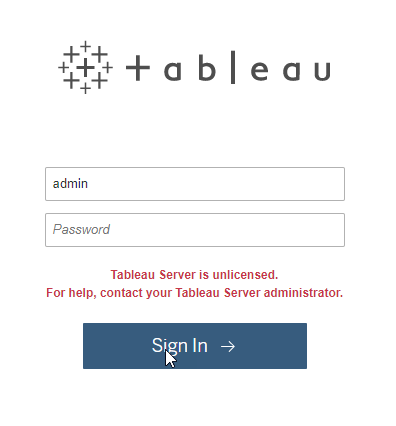
So what do you need to do ?
Find and contact Tableau friendly sales people or Tableau partners in your area and buy / renew the subscription. Tableau will send you email with your new subscription license key.
You can activate the new license key using tsm commands, so open your linux Terminal and type below commands.
Check Tableau server processes status, to make sure the License Manager and a few other processes still running.
[centosadmin@cent1051 ~]$ tsm status -v
Logging in as user ‘centosadmin’ since no –username flag was given.
Password:
node1: localhost
Status: DEGRADED
‘Tableau Server Gateway 0’ is running.
‘Tableau Server Application Server 0’ is in an error state.
‘Tableau Server VizQL Server 0’ is in an error state.
‘Tableau Server Cache Server 0’ is running.
‘Tableau Server Coordination Service 0’ is running.
‘Tableau Server Cluster Controller 0’ is running.
‘Tableau Server Search And Browse 0’ is running.
‘Tableau Server Backgrounder 0’ is in an error state.
‘Tableau Server Data Server 0’ is in an error state.
‘Tableau Server Data Engine 0’ is running.
‘Tableau Server File Store 0’ is running.
‘Tableau Server Repository 0’ is running (Active Repository).
‘Tableau Server Administration Agent 0’ is running.
‘Tableau Server Administration Controller 0’ is running.
‘Tableau Server Service Manager 0’ is running.
‘Tableau Server License Manager 0’ is running.
‘Tableau Server Database Maintenance 0’ is stopped.
‘Tableau Server Backup/Restore 0’ is stopped.
‘Tableau Server Site Import/Export 0’ is stopped.
‘Tableau Server SAML Service 0’ is stopped.
Activate your new license key using tsm licenses activate command.
[centosadmin@cent1051 ~]$ tsm licenses activate -k XXXX-XXXXX-XXXX-XXXXX
License key activated.
Restart server for license change to take effect.
[centosadmin@cent1051 ~]$ tsm restart
Stopping service…
Service stopped successfully.
Starting service…
Unable to determine if all components of the service started properly.
node1: localhost
Status: DEGRADED
‘Tableau Server Gateway 0’ is in an error state.
‘Tableau Server Application Server 0’ status is unavailable.
‘Tableau Server VizQL Server 0’ is running.
‘Tableau Server Cache Server 0’ is in an error state.
‘Tableau Server Coordination Service 0’ is running.
‘Tableau Server Cluster Controller 0’ status is unavailable.
‘Tableau Server Search And Browse 0’ is in an error state.
‘Tableau Server Backgrounder 0’ is running.
‘Tableau Server Data Server 0’ status is unavailable.
‘Tableau Server Data Engine 0’ is in an error state.
‘Tableau Server File Store 0’ is in an error state.
‘Tableau Server Repository 0’ is in an error state.
‘Tableau Server Administration Agent 0’ is running.
‘Tableau Server Administration Controller 0’ is in an error state.
‘Tableau Server Service Manager 0’ is running.
‘Tableau Server License Manager 0’ is running.
‘Tableau Server Database Maintenance 0’ is stopped.
‘Tableau Server Backup/Restore 0’ is stopped.
‘Tableau Server Site Import/Export 0’ is stopped.
‘Tableau Server SAML Service 0’ is stopped.
See ‘/home/centosadmin/.tableau/tsm/tsm.log’ for more information.
Tableau Server need time to start all processes.
Let’s make sure our new license key license expiry date applied correctly.
[centosadmin@cent1051 ~]$ tsm licenses list
Logging in as user ‘centosadmin’ since no –username flag was given.
Password:
Number of product keys: 1
KEY CORES LIC EXP MAINT EXP GUEST ACCESS
XXXX-XXXXX-XXXX-XXXXX 32 5/1/18 5/1/18 true
Give tableau server a few minutes to start all processes.
Then check again using tsm status.
[centosadmin@cent1051 ~]$ tsm status -v
node1: localhost
Status: RUNNING
‘Tableau Server Gateway 0’ is running.
‘Tableau Server Application Server 0’ is running.
‘Tableau Server VizQL Server 0’ is running.
‘Tableau Server Cache Server 0’ is running.
‘Tableau Server Coordination Service 0’ is running.
‘Tableau Server Cluster Controller 0’ is running.
‘Tableau Server Search And Browse 0’ is running.
‘Tableau Server Backgrounder 0’ is running.
‘Tableau Server Data Server 0’ is running.
‘Tableau Server Data Engine 0’ is running.
‘Tableau Server File Store 0’ is running.
‘Tableau Server Repository 0’ is running (Active Repository).
‘Tableau Server Administration Agent 0’ is running.
‘Tableau Server Administration Controller 0’ is running.
‘Tableau Server Service Manager 0’ is running.
‘Tableau Server License Manager 0’ is running.
‘Tableau Server Database Maintenance 0’ is stopped.
‘Tableau Server Backup/Restore 0’ is stopped.
‘Tableau Server Site Import/Export 0’ is stopped.
‘Tableau Server SAML Service 0’ is stopped.[centosadmin@cent1051 ~]$
All working fine, now you can use it again to find more insights, help humanity, and go home early 🙂
Enjoy today my friends 🙂
UPDATES
Forget to tell you that we will remind our customers to renew the subscription / maintenance before it happens.
For our existing customers, Tableau support team will automatically email the tableau administrator in your organization 3 months before the expired date. There will be another email every month after that and a week before expiration date. I forget the details but you will get a few emails starting 3 months before.
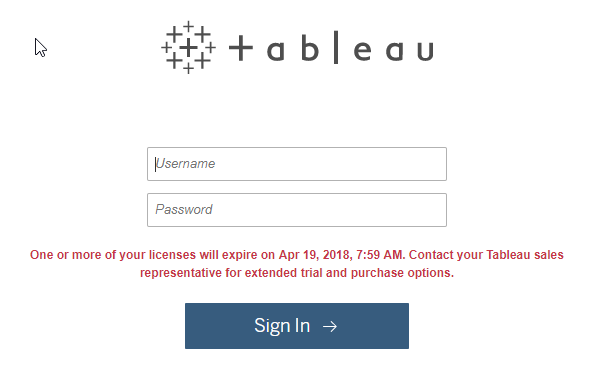
For trial license user and our existing customers, you will also see this message from your tableau server login page:
Data everywhere. Tableau for Everyone 🙂

