
Tableau Server supports Distributed Architecture and High Availability by adding Worker Node to Primary node. Linux version will also support Distributed & HA architecture. But in 10.5 Beta 5 we can only use TSM CLI command to add the worker node. Final production version of 10.5 will include TSM Web UI that can be used to add Worker Node graphically. In this post i will focus on TSM CLI commands.
Let’s start with a refresher on Tableau Server Distributed & High Availability architecture.
Distributed Architecture
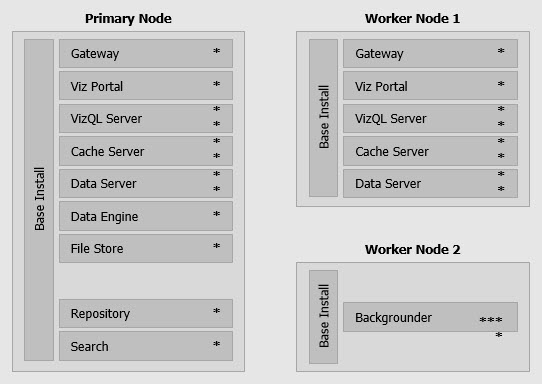
Distributed architecture will have a minimum of 2 nodes in the cluster: 1 Primary node + 1 Worker node. You just need to add more Worker node to Scale Out the cluster when needed. Distributed architecture will look like this:

Or with 2 worker nodes to share the load will look like this:
High Availability
Tableau Server support Partial HA and Full HA.
Partial High Availability architecture
Partial HA will have 1 Primary node + 2 Worker nodes like below:
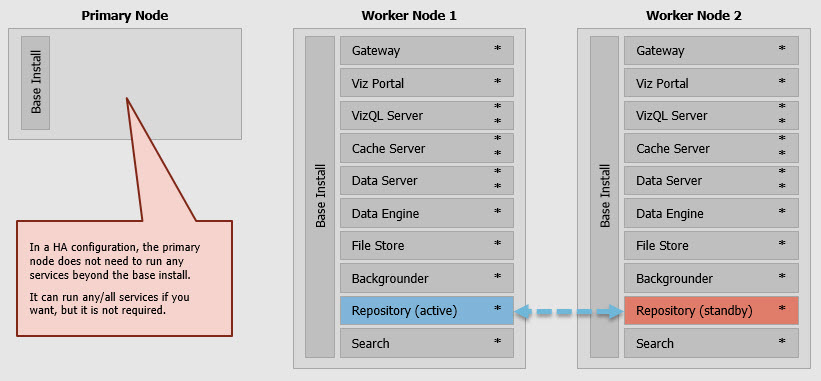
Real implementation will need external Load Balancer to help route the traffic between nodes in the cluster:

Primary node will only have Base Install which include: Cluster Controller, Coordination Service, Search, Cache server, Licensing server, Gateway. Worker node will include all other important engines such as: Vizql, Vizportal, Backgrounder, etc.
In the above architecture, if Worker node 2 goes down then the cluster will be up and running, no problem at all because the active Repository database is inside Worker node 1, the users that already connected to Worker 2 will get error and when they refresh the browser, Load Balancer will re-route the traffic to Worker 1 and they can continue to use Tableau server.
If Worker node 1 goes down, Worker node 2 will know and change the Standby Repository database into Active Repository database, this process will takes a few minutes depending on the hardware specifications. The users already using Worker node 1 will get errors and when they refresh the browser then the Load Balancer will re-route the traffic to Worker node 2 and the user need to wait until the Standby Repository become active repository and then continue to view dashboard from Worker node 2.
So what happen when Primary node goes down ?
When that happen, the cluster will still running fine for maximum of 72 hours. Worker node 1 and Worker node 2 will normally serve users for maximum of 72 hours. Within 72 hours, you need to fix the Primary node and add it to the cluster. If you failed to fix Primary node after 72 hours then the whole cluster will goes down. All worker nodes will check their license to the licensing engine inside Primary node every 8 hours, when the checking failed then the 72 hours counter will run. This is why we called this architecture “Partial” HA architecture.
Full High Availability architecture
Full HA architecture will include minimum of: 1 Primary node + 1 Backup Primary node + 2 Worker nodes:
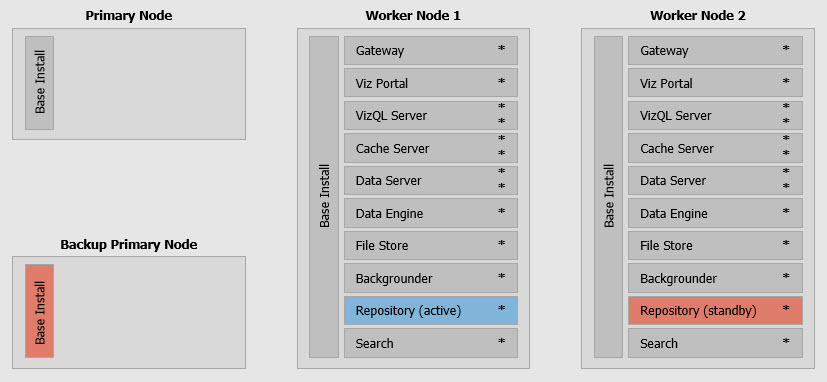
Everything will be the same just like the Partial HA architecture except the addition of Backup Primary Node.
When Primary Node goes down, you just need to go to the Backup Primary Node and run tabadmin failoverprimary command (in version 10.4 and below) and the Backup Primary Node will become the new Primary Node.
The process will takes a few minutes so you don’t need to worry about the 72 hours counter. The users will not feel anything when this happens because the worker nodes still up and running. After a few minutes, the Backup Primary node will become the new Primary node. The administrator then can fix the old problematic Primary node and fix it and add it back to the cluster as the new Backup Primary node. You can automate the whole process using scripting or any programming language that can execute tabadmin commands.
Tableau Server 10.5 will not have tabadmin anymore, tsm commands will replace tabadmin and 10.5 will have a different concept of Primary Node so tsm doesn’t have the failoverprimary command. I will write a different article on this. Coming soon !
More information on Tableau Server High Availability here.
So what to expect when adding Worker node to create Distributed Architecture in 10.5 Beta 5 using TSM CLI
I expect you to already have a running Tableau Server 10.5 Beta 5 on Ubuntu 16.04 LTS.
If you don’t have it yet, check out my previous post.
Now we want to create a Distributed Architecture by adding 1 Worker node:
Step 1: on Primary Node, add firewall rich rule to open port 8000 to 9000
Check if Primary Node running:
ubuntuadmin@uts105beta2:~$ tsm status -v
Logging in as user ‘ubuntuadmin’ since no –username flag was given.
Password:
node1: localhost
Status: RUNNING
‘Tableau Server Gateway 0’ is running.
‘Tableau Server Application Server 0’ is running.
‘Tableau Server VizQL Server 0’ is running.
‘Tableau Server Cache Server 0’ is running.
‘Tableau Server Coordination Service 0’ is running.
‘Tableau Server Cluster Controller 0’ is running.
‘Tableau Server Search And Browse 0’ is running.
‘Tableau Server Backgrounder 0’ is running.
‘Tableau Server Data Server 0’ is running.
‘Tableau Server Hyper 0’ is running.
‘Tableau Server File Store 0’ is running.
‘Tableau Server Repository 0’ is running (Active Repository).
‘Tableau Server Administration Agent 0’ is running.
‘Tableau Server Administration Controller 0’ is running.
‘Tableau Server Service Manager 0’ is running.
‘Tableau Server License Manager 0’ is running.
‘Tableau Server Database Maintenance 0’ is stopped.
‘Tableau Server Backup/Restore 0’ is stopped.
‘Tableau Server Site Import/Export 0’ is stopped.
‘Tableau Server SAML Service 0’ is stopped.
Check the list of ports used by Tableau server engines:
ubuntuadmin@uts105beta2:~/Downloads$ tsm topology list-ports
Node Name Instance Port
node1 filestore:primary 0 8188
node1 filestore:status 0 8429
node1 siteimportexport:primary 0 8939
node1 databasemaintenance:primary 0 8339
node1 dataserver:primary 0 8924
node1 dataserver:debug 0 8559
node1 dataserver:jmx 0 8012
node1 dataserver:jmx.rmi 0 8950
node1 cacheserver:primary 0 8203
node1 tabadmincontroller:primary 0 8850
node1 vizqlserver:primary 0 8790
node1 vizqlserver:debug 0 8749
node1 vizqlserver:jmx 0 8949
node1 vizqlserver:jmx.rmi 0 8368
node1 backgrounder:primary 0 8890
node1 backgrounder:debug 0 8728
node1 backgrounder:jmx 0 8223
node1 backgrounder:jmx.rmi 0 8611
node1 appzookeeper:peer 0 8306
node1 appzookeeper:leader 0 8932
node1 appzookeeper:client 0 8839
node1 searchserver:primary 0 8584
node1 searchserver:debug 0 8638
node1 searchserver:jmx 0 8720
node1 searchserver:jmx.rmi 0 8357
node1 searchserver:startup 0 8608
node1 clustercontroller:status 0 8704
node1 clustercontroller:storage 0 8245
node1 vizportal:primary 0 8833
node1 vizportal:debug 0 8362
node1 vizportal:jmx 0 8831
node1 vizportal:jmx.rmi 0 8229
node1 vizportal:authentication 0 8865
node1 vizportal:authorization 0 8159
node1 vizportal:maintenance 0 8211
node1 vizportal:publishing 0 8995
node1 vizportal:recommendations 0 8551
node1 vizportal:recommendations.trainer 0 8169
node1 backuprestore:primary 0 8785
node1 hyper:primary 0 8364
node1 hyper:connection 0 8267
node1 samlservice:primary 0 8494
node1 gateway:primary 0 80
node1 tabadminagent:filetransfer 0 8319
Get the minimum and maximum ports range used in the current installation:
ubuntuadmin@uts105beta2:~/Downloads$ tsm configuration get -k ports.range.min
8000
ubuntuadmin@uts105beta2:~/Downloads$ tsm configuration get -k ports.range.max
9000
8000 – 9000 is the default, you can change it to follow your company policy.
Tableau Server 10.5 needs the above ports to be opened on all the nodes in the cluster so the tableau server processes can communicate with each other.
When you install 10.5, you will already open port 80 for HTTP and port 8850 for TSM.
Now let’s open port 8000 to 9000 for Worker node IP address by adding rich rules and restart the firewall:
ubuntuadmin@uts105beta2:~/Downloads$ firewall-cmd –get-default-zone
public
ubuntuadmin@uts105beta2:~/Downloads$ sudo firewall-cmd –permanent –add-rich-rule=’rule family=ipv4 source address=10.68.0.42/32 port port=8000-9000 protocol=tcp accept’
[sudo]
password for ubuntuadmin:
success
ubuntuadmin@uts105beta2:~/Downloads$ sudo firewall-cmd –reload
success
ubuntuadmin@uts105beta2:~/Downloads$ sudo firewall-cmd –list-all
public (default, active)
interfaces: eth0
sources:
services: dhcpv6-client ssh
ports: 8850/tcp 80/tcp 8839/tcp
protocols:
masquerade: no
forward-ports:
icmp-blocks:
rich rules:
rule family=”ipv4″ source address=”10.68.0.42/32″ port port=”8000-9000″ protocol=”tcp” accept
Step 2: on Primary node, get the bootstrap file that contains the secret key and other configurations, then copy the bootstrap key to Worker node
Get the bootstrap JSON file from Primary node:
ubuntuadmin@uts105beta2:~/Downloads$ tsm topology nodes get-bootstrap-file –file thirdjanbootstrap.json
Setup file written to /home/ubuntuadmin/Downloads/thirdjanbootstrap.json.
Copy the JSON file to Worker node.
For more security you can export and import the secret file using these methods.
Step 3: on Worker node, install Tableau Server 10.5 Beta 5 and use the bootstrap file at initialize tsm
Prepare the OS by updating the apt, then install firewalld and openssh-server
ubuntuadmin@uts105beta5w2:~$ sudo apt-get update
[sudo]
password for ubuntuadmin:
Hit:1 http://sg.archive.ubuntu.com/ubuntu xenial InRelease
Hit:2 http://security.ubuntu.com/ubuntu xenial-security InRelease
Hit:3 http://sg.archive.ubuntu.com/ubuntu xenial-updates InRelease
Hit:4 http://sg.archive.ubuntu.com/ubuntu xenial-backports InRelease
Reading package lists… Done
ubuntuadmin@uts105beta5w2:~$ sudo apt install firewalld
Reading package lists… Done
Building dependency tree
Reading state information… Done
The following additional packages will be installed:
ebtables ipset libipset3 python3-decorator python3-selinux python3-slip python3-slip-dbus
The following NEW packages will be installed:
ebtables firewalld ipset libipset3 python3-decorator python3-selinux python3-slip python3-slip-dbus
0 upgraded, 8 newly installed, 0 to remove and 268 not upgraded.
Need to get 701 kB of archives.
After this operation, 4,442 kB of additional disk space will be used.
Do you want to continue? [Y/n] Y
Get:1 http://sg.archive.ubuntu.com/ubuntu xenial-updates/main amd64 ebtables amd64 2.0.10.4-3.4ubuntu2 [79.4 kB]
Get:2 http://sg.archive.ubuntu.com/ubuntu xenial/universe amd64 python3-decorator all 4.0.6-1 [9,388 B]
Get:3 http://sg.archive.ubuntu.com/ubuntu xenial/universe amd64 python3-selinux amd64 2.4-3build2 [173 kB]
Get:4 http://sg.archive.ubuntu.com/ubuntu xenial/universe amd64 python3-slip all 0.6.1-3 [6,762 B]
Get:5 http://sg.archive.ubuntu.com/ubuntu xenial/universe amd64 python3-slip-dbus all 0.6.1-3 [8,808 B]
Get:6 http://sg.archive.ubuntu.com/ubuntu xenial-updates/universe amd64 firewalld all 0.4.0-1ubuntu0.1 [346 kB]
Get:7 http://sg.archive.ubuntu.com/ubuntu xenial/main amd64 libipset3 amd64 6.29-1 [43.6 kB]
Get:8 http://sg.archive.ubuntu.com/ubuntu xenial/main amd64 ipset amd64 6.29-1 [33.3 kB]
Fetched 701 kB in 2s (341 kB/s)
Selecting previously unselected package ebtables.
(Reading database … 175298 files and directories currently installed.)
Preparing to unpack …/ebtables_2.0.10.4-3.4ubuntu2_amd64.deb …
Unpacking ebtables (2.0.10.4-3.4ubuntu2) …
Selecting previously unselected package python3-decorator.
Preparing to unpack …/python3-decorator_4.0.6-1_all.deb …
Unpacking python3-decorator (4.0.6-1) …
Selecting previously unselected package python3-selinux.
Preparing to unpack …/python3-selinux_2.4-3build2_amd64.deb …
Unpacking python3-selinux (2.4-3build2) …
Selecting previously unselected package python3-slip.
Preparing to unpack …/python3-slip_0.6.1-3_all.deb …
Unpacking python3-slip (0.6.1-3) …
Selecting previously unselected package python3-slip-dbus.
Preparing to unpack …/python3-slip-dbus_0.6.1-3_all.deb …
Unpacking python3-slip-dbus (0.6.1-3) …
Selecting previously unselected package firewalld.
Preparing to unpack …/firewalld_0.4.0-1ubuntu0.1_all.deb …
Unpacking firewalld (0.4.0-1ubuntu0.1) …
Selecting previously unselected package libipset3:amd64.
Preparing to unpack …/libipset3_6.29-1_amd64.deb …
Unpacking libipset3:amd64 (6.29-1) …
Selecting previously unselected package ipset.
Preparing to unpack …/ipset_6.29-1_amd64.deb …
Unpacking ipset (6.29-1) …
Processing triggers for systemd (229-4ubuntu19) …
Processing triggers for ureadahead (0.100.0-19) …
Processing triggers for man-db (2.7.5-1) …
Processing triggers for dbus (1.10.6-1ubuntu3.3) …
Processing triggers for libc-bin (2.23-0ubuntu9) …
Setting up ebtables (2.0.10.4-3.4ubuntu2) …
update-rc.d: warning: start and stop actions are no longer supported; falling back to defaults
Setting up python3-decorator (4.0.6-1) …
Setting up python3-selinux (2.4-3build2) …
Setting up python3-slip (0.6.1-3) …
Setting up python3-slip-dbus (0.6.1-3) …
Setting up firewalld (0.4.0-1ubuntu0.1) …
Setting up libipset3:amd64 (6.29-1) …
Setting up ipset (6.29-1) …
Processing triggers for systemd (229-4ubuntu19) …
Processing triggers for ureadahead (0.100.0-19) …
Processing triggers for dbus (1.10.6-1ubuntu3.3) …
Processing triggers for libc-bin (2.23-0ubuntu9) …
ubuntuadmin@uts105beta5w2:~$ sudo apt install openssh-server
Reading package lists… Done
Building dependency tree
Reading state information… Done
The following additional packages will be installed:
ncurses-term openssh-sftp-server ssh-import-id
Suggested packages:
ssh-askpass rssh molly-guard monkeysphere
The following NEW packages will be installed:
ncurses-term openssh-server openssh-sftp-server ssh-import-id
0 upgraded, 4 newly installed, 0 to remove and 268 not upgraded.
Need to get 636 kB of archives.
After this operation, 5,145 kB of additional disk space will be used.
Do you want to continue? [Y/n] Y
Get:1 http://sg.archive.ubuntu.com/ubuntu xenial/main amd64 ncurses-term all 6.0+20160213-1ubuntu1 [249 kB]
Get:2 http://sg.archive.ubuntu.com/ubuntu xenial-updates/main amd64 openssh-sftp-server amd64 1:7.2p2-4ubuntu2.2 [38.7 kB]
Get:3 http://sg.archive.ubuntu.com/ubuntu xenial-updates/main amd64 openssh-server amd64 1:7.2p2-4ubuntu2.2 [338 kB]
Get:4 http://sg.archive.ubuntu.com/ubuntu xenial/main amd64 ssh-import-id all 5.5-0ubuntu1 [10.2 kB]
Fetched 636 kB in 2s (317 kB/s)
Preconfiguring packages …
Selecting previously unselected package ncurses-term.
(Reading database … 175632 files and directories currently installed.)
Preparing to unpack …/ncurses-term_6.0+20160213-1ubuntu1_all.deb …
Unpacking ncurses-term (6.0+20160213-1ubuntu1) …
Selecting previously unselected package openssh-sftp-server.
Preparing to unpack …/openssh-sftp-server_1%3a7.2p2-4ubuntu2.2_amd64.deb …
Unpacking openssh-sftp-server (1:7.2p2-4ubuntu2.2) …
Selecting previously unselected package openssh-server.
Preparing to unpack …/openssh-server_1%3a7.2p2-4ubuntu2.2_amd64.deb …
Unpacking openssh-server (1:7.2p2-4ubuntu2.2) …
Selecting previously unselected package ssh-import-id.
Preparing to unpack …/ssh-import-id_5.5-0ubuntu1_all.deb …
Unpacking ssh-import-id (5.5-0ubuntu1) …
Processing triggers for man-db (2.7.5-1) …
Processing triggers for ufw (0.35-0ubuntu2) …
Processing triggers for systemd (229-4ubuntu19) …
Processing triggers for ureadahead (0.100.0-19) …
Setting up ncurses-term (6.0+20160213-1ubuntu1) …
Setting up openssh-sftp-server (1:7.2p2-4ubuntu2.2) …
Setting up openssh-server (1:7.2p2-4ubuntu2.2) …
Creating SSH2 RSA key; this may take some time …
2048 SHA256:cZF6QonJ59txHSCsMsqMQAZWiHPbnimszXsZoX7oVFA root@uts105beta5w2 (RSA)
Creating SSH2 DSA key; this may take some time …
1024 SHA256:SYTxiZSfgH5rSbAISkwyLQkZxqKrhaRARL/0JaEZOYQ root@uts105beta5w2 (DSA)
Creating SSH2 ECDSA key; this may take some time …
256 SHA256:sYsMCDdxsvwhkwa06eUVad6NkQxKNR9BFpJR77coFWw root@uts105beta5w2 (ECDSA)
Creating SSH2 ED25519 key; this may take some time …
256 SHA256:4SgkWAFsLJxL8Euk3l8eAC/Jdlb2oyg09VPLlmZb0XM root@uts105beta5w2 (ED25519)
Setting up ssh-import-id (5.5-0ubuntu1) …
Processing triggers for systemd (229-4ubuntu19) …
Processing triggers for ureadahead (0.100.0-19) …
Processing triggers for ufw (0.35-0ubuntu2) …
Open port 80 for HTTP, 8850 for TSM, and 8000-9000 to Primary node IP address so the Primary node server processes can communicate with the Worker node server processes:
ubuntuadmin@uts105beta5w2:~$ sudo firewall-cmd –list-all
public (default, active)
interfaces: eth0
sources:
services: dhcpv6-client ssh
ports:
protocols:
masquerade: no
forward-ports:
icmp-blocks:
rich rules:ubuntuadmin@uts105beta5w2:~$ sudo firewall-cmd –set-default-zone=public
Warning: ZONE_ALREADY_SET: public
ubuntuadmin@uts105beta5w2:~$ sudo firewall-cmd –permanent –add-port=80/tcp
success
ubuntuadmin@uts105beta5w2:~$ sudo firewall-cmd –permanent –add-port=8850/tcp
success
ubuntuadmin@uts105beta5w2:~$ sudo firewall-cmd –permanent –add-rich-rule=’rule family=ipv4 source address=10.68.0.58/32 port port=8000-9000 protocol=tcp accept’
[sudo]
password for ubuntuadmin:
success
ubuntuadmin@uts105beta5w2:~$ sudo firewall-cmd –reload
success
ubuntuadmin@uts105beta5w2:~$ sudo firewall-cmd –list-all
public (default, active)
interfaces: eth0
sources:
services: dhcpv6-client ssh
ports: 80/tcp 8850/tcp 8839/tcp
protocols:
masquerade: no
forward-ports:
icmp-blocks:
rich rules:
rule family=”ipv4″ source address=”10.68.0.58/32″ port port=”8000-9000″ protocol=”tcp” accept
Install Tableau Server 10.5 Beta 5 using gdebi-core:
ubuntuadmin@uts105beta5w2:~$ cd Downloads/
ubuntuadmin@uts105beta5w2:~/Downloads$ ls
adding worker node with bootstrap error.txt registration_file.json ts105beta2bootstrap.json
app-worker-install.log tableau-server-10.5-beta5-1_amd64.deb
control-tabadminagent-0.log thirdjanbootstrap.json
ubuntuadmin@uts105beta5w2:~/Downloads$ sudo apt-get install gdebi-core
Reading package lists… Done
Building dependency tree
Reading state information… Done
The following NEW packages will be installed:
gdebi-core
0 upgraded, 1 newly installed, 0 to remove and 268 not upgraded.
Need to get 9,716 B of archives.
After this operation, 135 kB of additional disk space will be used.
Get:1 http://sg.archive.ubuntu.com/ubuntu xenial/main amd64 gdebi-core all 0.9.5.7ubuntu1 [9,716 B]
Fetched 9,716 B in 0s (26.9 kB/s)
Selecting previously unselected package gdebi-core.
(Reading database … 178390 files and directories currently installed.)
Preparing to unpack …/gdebi-core_0.9.5.7ubuntu1_all.deb …
Unpacking gdebi-core (0.9.5.7ubuntu1) …
Processing triggers for man-db (2.7.5-1) …
Setting up gdebi-core (0.9.5.7ubuntu1) …
ubuntuadmin@uts105beta5w2:~/Downloads$ ping uts105beta2
PING uts105beta2.tsi.lan (10.68.0.58) 56(84) bytes of data.
64 bytes from uts105beta2.tsi.lan (10.68.0.58): icmp_seq=1 ttl=64 time=5.15 ms
64 bytes from uts105beta2.tsi.lan (10.68.0.58): icmp_seq=2 ttl=64 time=3.64 ms
64 bytes from uts105beta2.tsi.lan (10.68.0.58): icmp_seq=3 ttl=64 time=0.939 ms
64 bytes from uts105beta2.tsi.lan (10.68.0.58): icmp_seq=4 ttl=64 time=0.412 ms
^C
— uts105beta2.tsi.lan ping statistics —
4 packets transmitted, 4 received, 0% packet loss, time 3004ms
rtt min/avg/max/mdev = 0.412/2.537/5.159/1.947 ms
ubuntuadmin@uts105beta5w2:~/Downloads$ ls
registration_file.json tableau-server-10.5-beta5-1_amd64.deb ts105beta2bootstrap.json
ubuntuadmin@uts105beta5w2:~/Downloads$ sudo gdebi -n tableau-server-10.5-beta5-1_amd64.deb
[sudo]
password for ubuntuadmin:
Reading package lists… Done
Building dependency tree
Reading state information… Done
Reading state information… Done
Get:1 http://sg.archive.ubuntu.com/ubuntu xenial/universe amd64 freeglut3 amd64 2.8.1-2 [73.4 kB]
Get:2 http://sg.archive.ubuntu.com/ubuntu xenial/main amd64 libsigsegv2 amd64 2.10-4 [14.1 kB]
Get:3 http://sg.archive.ubuntu.com/ubuntu xenial/main i386 gcc-6-base i386 6.0.1-0ubuntu1 [14.3 kB]
Get:4 http://sg.archive.ubuntu.com/ubuntu xenial/main i386 libgcc1 i386 1:6.0.1-0ubuntu1 [46.8 kB]
Get:5 http://sg.archive.ubuntu.com/ubuntu xenial-updates/main i386 libc6 i386 2.23-0ubuntu9 [2269 kB]
Get:6 http://sg.archive.ubuntu.com/ubuntu xenial-updates/main i386 zlib1g i386 1:1.2.8.dfsg-2ubuntu4.1 [52.1 kB]
Get:7 http://sg.archive.ubuntu.com/ubuntu xenial/main amd64 po-debconf all 1.0.19 [234 kB]
Get:8 http://sg.archive.ubuntu.com/ubuntu xenial/main amd64 libfile-stripnondeterminism-perl all 0.015-1 [10.3 kB]
Get:9 http://sg.archive.ubuntu.com/ubuntu xenial/main amd64 dh-strip-nondeterminism all 0.015-1 [4864 B]
Get:10 http://sg.archive.ubuntu.com/ubuntu xenial/main amd64 autotools-dev all 20150820.1 [39.8 kB]
Get:11 http://sg.archive.ubuntu.com/ubuntu xenial/main amd64 debhelper all 9.20160115ubuntu3 [739 kB]
Get:12 http://sg.archive.ubuntu.com/ubuntu xenial/universe amd64 librpmio3 amd64 4.12.0.1+dfsg1-3build3 [68.7 kB]
Get:13 http://sg.archive.ubuntu.com/ubuntu xenial/universe amd64 librpm3 amd64 4.12.0.1+dfsg1-3build3 [155 kB]
Get:14 http://sg.archive.ubuntu.com/ubuntu xenial/universe amd64 librpmbuild3 amd64 4.12.0.1+dfsg1-3build3 [58.0 kB]
Get:15 http://sg.archive.ubuntu.com/ubuntu xenial/universe amd64 librpmsign3 amd64 4.12.0.1+dfsg1-3build3 [8192 B]
Get:16 http://sg.archive.ubuntu.com/ubuntu xenial/universe amd64 rpm-common amd64 4.12.0.1+dfsg1-3build3 [25.7 kB]
Get:17 http://sg.archive.ubuntu.com/ubuntu xenial/universe amd64 rpm2cpio amd64 4.12.0.1+dfsg1-3build3 [7756 B]
Get:18 http://sg.archive.ubuntu.com/ubuntu xenial/universe amd64 debugedit amd64 4.12.0.1+dfsg1-3build3 [15.5 kB]
Get:19 http://sg.archive.ubuntu.com/ubuntu xenial/universe amd64 rpm amd64 4.12.0.1+dfsg1-3build3 [114 kB]
Get:20 http://sg.archive.ubuntu.com/ubuntu xenial/universe amd64 alien all 8.95 [54.5 kB]
Get:21 http://sg.archive.ubuntu.com/ubuntu xenial/main amd64 at amd64 3.1.18-2ubuntu1 [37.8 kB]
Get:22 http://sg.archive.ubuntu.com/ubuntu xenial/main amd64 java-common all 0.56ubuntu2 [7742 B]
Get:23 http://sg.archive.ubuntu.com/ubuntu xenial-updates/main amd64 openjdk-8-jre-headless amd64 8u151-b12-0ubuntu0.16.04.2 [27.0 MB]
Get:24 http://sg.archive.ubuntu.com/ubuntu xenial-updates/main amd64 ca-certificates-java all 20160321ubuntu1 [12.5 kB]
Get:25 http://sg.archive.ubuntu.com/ubuntu xenial/main amd64 libsys-hostname-long-perl all 1.5-1 [11.7 kB]
Get:26 http://sg.archive.ubuntu.com/ubuntu xenial/main amd64 libmail-sendmail-perl all 0.79.16-1 [26.5 kB]
Get:27 http://sg.archive.ubuntu.com/ubuntu xenial/main amd64 m4 amd64 1.4.17-5 [195 kB]
Get:28 http://sg.archive.ubuntu.com/ubuntu xenial/main amd64 pax amd64 1:20151013-1 [78.8 kB]
Get:29 http://sg.archive.ubuntu.com/ubuntu xenial/universe amd64 s-nail amd64 14.8.6-1 [353 kB]
Get:30 http://sg.archive.ubuntu.com/ubuntu xenial-updates/universe amd64 lsb-invalid-mta all 9.20160110ubuntu0.2 [5670 B]
Get:31 http://sg.archive.ubuntu.com/ubuntu xenial-updates/universe amd64 lsb-security amd64 9.20160110ubuntu0.2 [5298 B]
Get:32 http://sg.archive.ubuntu.com/ubuntu xenial-updates/universe amd64 lsb-core amd64 9.20160110ubuntu0.2 [11.2 kB]
Fetched 31.7 MB in 6s (609 kB/s)
Extracting templates from packages: 100%
Preconfiguring packages …
Extracting templates from packages: 100%
Preconfiguring packages …
Selecting previously unselected package freeglut3:amd64.
(Reading database … 178404 files and directories currently installed.)
Preparing to unpack …/freeglut3_2.8.1-2_amd64.deb …
Unpacking freeglut3:amd64 (2.8.1-2) …
Selecting previously unselected package libsigsegv2:amd64.
Preparing to unpack …/libsigsegv2_2.10-4_amd64.deb …
Unpacking libsigsegv2:amd64 (2.10-4) …
Selecting previously unselected package gcc-6-base:i386.
Preparing to unpack …/gcc-6-base_6.0.1-0ubuntu1_i386.deb …
Unpacking gcc-6-base:i386 (6.0.1-0ubuntu1) …
Selecting previously unselected package libgcc1:i386.
Preparing to unpack …/libgcc1_1%3a6.0.1-0ubuntu1_i386.deb …
Unpacking libgcc1:i386 (1:6.0.1-0ubuntu1) …
Selecting previously unselected package libc6:i386.
Preparing to unpack …/libc6_2.23-0ubuntu9_i386.deb …
Unpacking libc6:i386 (2.23-0ubuntu9) …
Selecting previously unselected package zlib1g:i386.
Preparing to unpack …/zlib1g_1%3a1.2.8.dfsg-2ubuntu4.1_i386.deb …
Unpacking zlib1g:i386 (1:1.2.8.dfsg-2ubuntu4.1) …
Selecting previously unselected package po-debconf.
Preparing to unpack …/po-debconf_1.0.19_all.deb …
Unpacking po-debconf (1.0.19) …
Selecting previously unselected package libfile-stripnondeterminism-perl.
Preparing to unpack …/libfile-stripnondeterminism-perl_0.015-1_all.deb …
Unpacking libfile-stripnondeterminism-perl (0.015-1) …
Selecting previously unselected package dh-strip-nondeterminism.
Preparing to unpack …/dh-strip-nondeterminism_0.015-1_all.deb …
Unpacking dh-strip-nondeterminism (0.015-1) …
Selecting previously unselected package autotools-dev.
Preparing to unpack …/autotools-dev_20150820.1_all.deb …
Unpacking autotools-dev (20150820.1) …
Selecting previously unselected package debhelper.
Preparing to unpack …/debhelper_9.20160115ubuntu3_all.deb …
Unpacking debhelper (9.20160115ubuntu3) …
Selecting previously unselected package librpmio3.
Preparing to unpack …/librpmio3_4.12.0.1+dfsg1-3build3_amd64.deb …
Unpacking librpmio3 (4.12.0.1+dfsg1-3build3) …
Selecting previously unselected package librpm3.
Preparing to unpack …/librpm3_4.12.0.1+dfsg1-3build3_amd64.deb …
Unpacking librpm3 (4.12.0.1+dfsg1-3build3) …
Selecting previously unselected package librpmbuild3.
Preparing to unpack …/librpmbuild3_4.12.0.1+dfsg1-3build3_amd64.deb …
Unpacking librpmbuild3 (4.12.0.1+dfsg1-3build3) …
Selecting previously unselected package librpmsign3.
Preparing to unpack …/librpmsign3_4.12.0.1+dfsg1-3build3_amd64.deb …
Unpacking librpmsign3 (4.12.0.1+dfsg1-3build3) …
Selecting previously unselected package rpm-common.
Preparing to unpack …/rpm-common_4.12.0.1+dfsg1-3build3_amd64.deb …
Unpacking rpm-common (4.12.0.1+dfsg1-3build3) …
Selecting previously unselected package rpm2cpio.
Preparing to unpack …/rpm2cpio_4.12.0.1+dfsg1-3build3_amd64.deb …
Unpacking rpm2cpio (4.12.0.1+dfsg1-3build3) …
Selecting previously unselected package debugedit.
Preparing to unpack …/debugedit_4.12.0.1+dfsg1-3build3_amd64.deb …
Unpacking debugedit (4.12.0.1+dfsg1-3build3) …
Selecting previously unselected package rpm.
Preparing to unpack …/rpm_4.12.0.1+dfsg1-3build3_amd64.deb …
Unpacking rpm (4.12.0.1+dfsg1-3build3) …
Selecting previously unselected package alien.
Preparing to unpack …/archives/alien_8.95_all.deb …
Unpacking alien (8.95) …
Selecting previously unselected package at.
Preparing to unpack …/at_3.1.18-2ubuntu1_amd64.deb …
Unpacking at (3.1.18-2ubuntu1) …
Selecting previously unselected package java-common.
Preparing to unpack …/java-common_0.56ubuntu2_all.deb …
Unpacking java-common (0.56ubuntu2) …
Selecting previously unselected package openjdk-8-jre-headless:amd64.
Preparing to unpack …/openjdk-8-jre-headless_8u151-b12-0ubuntu0.16.04.2_amd64.deb …
Unpacking openjdk-8-jre-headless:amd64 (8u151-b12-0ubuntu0.16.04.2) …
Selecting previously unselected package ca-certificates-java.
Preparing to unpack …/ca-certificates-java_20160321ubuntu1_all.deb …
Unpacking ca-certificates-java (20160321ubuntu1) …
Selecting previously unselected package libsys-hostname-long-perl.
Preparing to unpack …/libsys-hostname-long-perl_1.5-1_all.deb …
Unpacking libsys-hostname-long-perl (1.5-1) …
Selecting previously unselected package libmail-sendmail-perl.
Preparing to unpack …/libmail-sendmail-perl_0.79.16-1_all.deb …
Unpacking libmail-sendmail-perl (0.79.16-1) …
Selecting previously unselected package m4.
Preparing to unpack …/archives/m4_1.4.17-5_amd64.deb …
Unpacking m4 (1.4.17-5) …
Selecting previously unselected package pax.
Preparing to unpack …/pax_1%3a20151013-1_amd64.deb …
Unpacking pax (1:20151013-1) …
Selecting previously unselected package s-nail.
Preparing to unpack …/s-nail_14.8.6-1_amd64.deb …
Unpacking s-nail (14.8.6-1) …
Selecting previously unselected package lsb-invalid-mta.
Preparing to unpack …/lsb-invalid-mta_9.20160110ubuntu0.2_all.deb …
Unpacking lsb-invalid-mta (9.20160110ubuntu0.2) …
Selecting previously unselected package lsb-security.
Preparing to unpack …/lsb-security_9.20160110ubuntu0.2_amd64.deb …
Unpacking lsb-security (9.20160110ubuntu0.2) …
Selecting previously unselected package lsb-core.
Preparing to unpack …/lsb-core_9.20160110ubuntu0.2_amd64.deb …
Unpacking lsb-core (9.20160110ubuntu0.2) …
Processing triggers for libc-bin (2.23-0ubuntu9) …
Processing triggers for man-db (2.7.5-1) …
Processing triggers for doc-base (0.10.7) …
Processing 1 added doc-base file…
Processing triggers for systemd (229-4ubuntu19) …
Processing triggers for ureadahead (0.100.0-19) …
Processing triggers for ca-certificates (20160104ubuntu1) …
Updating certificates in /etc/ssl/certs…
0 added, 0 removed; done.
Running hooks in /etc/ca-certificates/update.d…
done.
Processing triggers for install-info (6.1.0.dfsg.1-5) …
Setting up freeglut3:amd64 (2.8.1-2) …
Setting up libsigsegv2:amd64 (2.10-4) …
Setting up gcc-6-base:i386 (6.0.1-0ubuntu1) …
Setting up po-debconf (1.0.19) …
Setting up libfile-stripnondeterminism-perl (0.015-1) …
Setting up autotools-dev (20150820.1) …
Setting up librpmio3 (4.12.0.1+dfsg1-3build3) …
Setting up librpm3 (4.12.0.1+dfsg1-3build3) …
Setting up librpmbuild3 (4.12.0.1+dfsg1-3build3) …
Setting up librpmsign3 (4.12.0.1+dfsg1-3build3) …
Setting up rpm-common (4.12.0.1+dfsg1-3build3) …
Setting up rpm2cpio (4.12.0.1+dfsg1-3build3) …
Setting up debugedit (4.12.0.1+dfsg1-3build3) …
Setting up rpm (4.12.0.1+dfsg1-3build3) …
Setting up at (3.1.18-2ubuntu1) …
Setting up java-common (0.56ubuntu2) …
Setting up libsys-hostname-long-perl (1.5-1) …
Setting up libmail-sendmail-perl (0.79.16-1) …
Setting up m4 (1.4.17-5) …
Setting up pax (1:20151013-1) …
Setting up s-nail (14.8.6-1) …
update-alternatives: using /usr/bin/s-nail to provide /usr/bin/mailx (mailx) in auto mode
Setting up lsb-invalid-mta (9.20160110ubuntu0.2) …
Setting up lsb-security (9.20160110ubuntu0.2) …
Setting up libgcc1:i386 (1:6.0.1-0ubuntu1) …
Setting up libc6:i386 (2.23-0ubuntu9) …
Setting up zlib1g:i386 (1:1.2.8.dfsg-2ubuntu4.1) …
Setting up debhelper (9.20160115ubuntu3) …
Setting up alien (8.95) …
Setting up openjdk-8-jre-headless:amd64 (8u151-b12-0ubuntu0.16.04.2) …
update-alternatives: using /usr/lib/jvm/java-8-openjdk-amd64/jre/bin/rmid to provide /usr/bin/rmid (rmid) in auto mode
update-alternatives: using /usr/lib/jvm/java-8-openjdk-amd64/jre/bin/java to provide /usr/bin/java (java) in auto mode
update-alternatives: using /usr/lib/jvm/java-8-openjdk-amd64/jre/bin/keytool to provide /usr/bin/keytool (keytool) in auto mode
update-alternatives: using /usr/lib/jvm/java-8-openjdk-amd64/jre/bin/jjs to provide /usr/bin/jjs (jjs) in auto mode
update-alternatives: using /usr/lib/jvm/java-8-openjdk-amd64/jre/bin/pack200 to provide /usr/bin/pack200 (pack200) in auto mode
update-alternatives: using /usr/lib/jvm/java-8-openjdk-amd64/jre/bin/rmiregistry to provide /usr/bin/rmiregistry (rmiregistry) in auto mode
update-alternatives: using /usr/lib/jvm/java-8-openjdk-amd64/jre/bin/unpack200 to provide /usr/bin/unpack200 (unpack200) in auto mode
update-alternatives: using /usr/lib/jvm/java-8-openjdk-amd64/jre/bin/orbd to provide /usr/bin/orbd (orbd) in auto mode
update-alternatives: using /usr/lib/jvm/java-8-openjdk-amd64/jre/bin/servertool to provide /usr/bin/servertool (servertool) in auto mode
update-alternatives: using /usr/lib/jvm/java-8-openjdk-amd64/jre/bin/tnameserv to provide /usr/bin/tnameserv (tnameserv) in auto mode
update-alternatives: using /usr/lib/jvm/java-8-openjdk-amd64/jre/lib/jexec to provide /usr/bin/jexec (jexec) in auto mode
Setting up ca-certificates-java (20160321ubuntu1) …
Adding debian:QuoVadis_Root_CA_1_G3.pem
Adding debian:Verisign_Class_3_Public_Primary_Certification_Authority_-_G2.pem
Adding debian:Trustis_FPS_Root_CA.pem
Adding debian:IGC_A.pem
Adding debian:Go_Daddy_Class_2_CA.pem
Adding debian:SwissSign_Silver_CA_-_G2.pem
Adding debian:TeliaSonera_Root_CA_v1.pem
Adding debian:Security_Communication_RootCA2.pem
Adding debian:GeoTrust_Global_CA_2.pem
Adding debian:TURKTRUST_Certificate_Services_Provider_Root_2007.pem
Adding debian:StartCom_Certification_Authority.pem
Adding debian:Deutsche_Telekom_Root_CA_2.pem
Adding debian:VeriSign_Class_3_Public_Primary_Certification_Authority_-_G5.pem
Adding debian:CA_WoSign_ECC_Root.pem
Adding debian:UTN_USERFirst_Email_Root_CA.pem
Adding debian:Buypass_Class_2_Root_CA.pem
Adding debian:COMODO_ECC_Certification_Authority.pem
Adding debian:Swisscom_Root_CA_1.pem
Adding debian:Entrust_Root_Certification_Authority_-_EC1.pem
Adding debian:CA_Disig.pem
Adding debian:COMODO_Certification_Authority.pem
Adding debian:Verisign_Class_1_Public_Primary_Certification_Authority_-_G3.pem
Adding debian:DigiCert_Assured_ID_Root_G3.pem
Adding debian:NetLock_Business_=Class_B=_Root.pem
Adding debian:ePKI_Root_Certification_Authority.pem
Adding debian:Microsec_e-Szigno_Root_CA_2009.pem
Adding debian:IdenTrust_Commercial_Root_CA_1.pem
Adding debian:Hongkong_Post_Root_CA_1.pem
Adding debian:D-TRUST_Root_Class_3_CA_2_EV_2009.pem
Adding debian:RSA_Security_2048_v3.pem
Adding debian:Global_Chambersign_Root_-_2008.pem
Adding debian:Go_Daddy_Root_Certificate_Authority_-_G2.pem
Adding debian:USERTrust_RSA_Certification_Authority.pem
Adding debian:Buypass_Class_3_Root_CA.pem
Adding debian:SwissSign_Gold_CA_-_G2.pem
Adding debian:CA_Disig_Root_R2.pem
Adding debian:Buypass_Class_2_CA_1.pem
Adding debian:ACCVRAIZ1.pem
Adding debian:IdenTrust_Public_Sector_Root_CA_1.pem
Adding debian:AddTrust_Public_Services_Root.pem
Adding debian:S-TRUST_Universal_Root_CA.pem
Adding debian:TC_TrustCenter_Class_3_CA_II.pem
Adding debian:WoSign.pem
Adding debian:T-TeleSec_GlobalRoot_Class_3.pem
Adding debian:AddTrust_Qualified_Certificates_Root.pem
Adding debian:thawte_Primary_Root_CA_-_G3.pem
Adding debian:Verisign_Class_3_Public_Primary_Certification_Authority_-_G3.pem
Adding debian:DST_Root_CA_X3.pem
Adding debian:E-Tugra_Certification_Authority.pem
Adding debian:Verisign_Class_1_Public_Primary_Certification_Authority_-_G2.pem
Adding debian:GeoTrust_Primary_Certification_Authority.pem
Adding debian:D-TRUST_Root_Class_3_CA_2_2009.pem
Adding debian:Hellenic_Academic_and_Research_Institutions_RootCA_2011.pem
Adding debian:AffirmTrust_Premium.pem
Adding debian:GeoTrust_Universal_CA_2.pem
Adding debian:QuoVadis_Root_CA_3_G3.pem
Adding debian:Sonera_Class_1_Root_CA.pem
Adding debian:Secure_Global_CA.pem
Adding debian:COMODO_RSA_Certification_Authority.pem
Adding debian:USERTrust_ECC_Certification_Authority.pem
Adding debian:China_Internet_Network_Information_Center_EV_Certificates_Root.pem
Adding debian:thawte_Primary_Root_CA_-_G2.pem
Adding debian:TÜBİTAK_UEKAE_Kök_Sertifika_Hizmet_Sağlayıcısı_-_Sürüm_3.pem
Adding debian:Starfield_Root_Certificate_Authority_-_G2.pem
Adding debian:Actalis_Authentication_Root_CA.pem
Adding debian:Equifax_Secure_eBusiness_CA_1.pem
Adding debian:Starfield_Class_2_CA.pem
Adding debian:Starfield_Services_Root_Certificate_Authority_-_G2.pem
Adding debian:Verisign_Class_3_Public_Primary_Certification_Authority_2.pem
Adding debian:T-TeleSec_GlobalRoot_Class_2.pem
Adding debian:Root_CA_Generalitat_Valenciana.pem
Adding debian:DigiCert_Trusted_Root_G4.pem
Adding debian:EE_Certification_Centre_Root_CA.pem
Adding debian:CFCA_EV_ROOT.pem
Adding debian:AffirmTrust_Premium_ECC.pem
Adding debian:ApplicationCA_-_Japanese_Government.pem
Adding debian:thawte_Primary_Root_CA.pem
Adding debian:Certum_Root_CA.pem
Adding debian:Camerfirma_Global_Chambersign_Root.pem
Adding debian:XRamp_Global_CA_Root.pem
Adding debian:Equifax_Secure_Global_eBusiness_CA.pem
Adding debian:StartCom_Certification_Authority_G2.pem
Adding debian:ssl-cert-snakeoil.pem
Adding debian:AddTrust_External_Root.pem
Adding debian:NetLock_Express_=Class_C=_Root.pem
Adding debian:Autoridad_de_Certificacion_Firmaprofesional_CIF_A62634068.pem
Adding debian:GlobalSign_ECC_Root_CA_-_R4.pem
Adding debian:Equifax_Secure_CA.pem
Adding debian:AddTrust_Low-Value_Services_Root.pem
Adding debian:Microsec_e-Szigno_Root_CA.pem
Adding debian:GlobalSign_ECC_Root_CA_-_R5.pem
Adding debian:AC_Raíz_Certicámara_S.A..pem
Adding debian:Staat_der_Nederlanden_EV_Root_CA.pem
Adding debian:Staat_der_Nederlanden_Root_CA_-_G2.pem
Adding debian:NetLock_Arany_=Class_Gold=_Főtanúsítvány.pem
Adding debian:Verisign_Class_3_Public_Primary_Certification_Authority.pem
Adding debian:Certplus_Class_2_Primary_CA.pem
Adding debian:DigiCert_Global_Root_G3.pem
Adding debian:QuoVadis_Root_CA.pem
Adding debian:Verisign_Class_2_Public_Primary_Certification_Authority_-_G3.pem
Adding debian:Chambers_of_Commerce_Root_-_2008.pem
Adding debian:TÜRKTRUST_Elektronik_Sertifika_Hizmet_Sağlayıcısı_H6.pem
Adding debian:OISTE_WISeKey_Global_Root_GA_CA.pem
Adding debian:Sonera_Class_2_Root_CA.pem
Adding debian:Swisscom_Root_CA_2.pem
Adding debian:Security_Communication_EV_RootCA1.pem
Adding debian:Comodo_Secure_Services_root.pem
Adding debian:Entrust.net_Premium_2048_Secure_Server_CA.pem
Adding debian:GlobalSign_Root_CA.pem
Adding debian:AffirmTrust_Commercial.pem
Adding debian:QuoVadis_Root_CA_3.pem
Adding debian:DST_ACES_CA_X6.pem
Adding debian:Comodo_AAA_Services_root.pem
Adding debian:Juur-SK.pem
Adding debian:Cybertrust_Global_Root.pem
Adding debian:EBG_Elektronik_Sertifika_Hizmet_Sağlayıcısı.pem
Adding debian:Certinomis_-_Autorité_Racine.pem
Adding debian:Taiwan_GRCA.pem
Adding debian:OISTE_WISeKey_Global_Root_GB_CA.pem
Adding debian:Visa_eCommerce_Root.pem
Adding debian:PSCProcert.pem
Adding debian:GlobalSign_Root_CA_-_R2.pem
Adding debian:DigiCert_Global_Root_G2.pem
Adding debian:NetLock_Notary_=Class_A=_Root.pem
Adding debian:Camerfirma_Chambers_of_Commerce_Root.pem
Adding debian:Staat_der_Nederlanden_Root_CA_-_G3.pem
Adding debian:QuoVadis_Root_CA_2.pem
Adding debian:certSIGN_ROOT_CA.pem
Adding debian:StartCom_Certification_Authority_2.pem
Adding debian:CA_Disig_Root_R1.pem
Adding debian:SwissSign_Platinum_CA_-_G2.pem
Adding debian:GlobalSign_Root_CA_-_R3.pem
Adding debian:TÜRKTRUST_Elektronik_Sertifika_Hizmet_Sağlayıcısı_H5.pem
Adding debian:DigiCert_High_Assurance_EV_Root_CA.pem
Adding debian:Entrust_Root_Certification_Authority_-_G2.pem
Adding debian:DigiCert_Assured_ID_Root_CA.pem
Adding debian:Baltimore_CyberTrust_Root.pem
Adding debian:CNNIC_ROOT.pem
Adding debian:QuoVadis_Root_CA_2_G3.pem
Adding debian:S-TRUST_Authentication_and_Encryption_Root_CA_2005_PN.pem
Adding debian:UTN_USERFirst_Hardware_Root_CA.pem
Adding debian:Certinomis_-_Root_CA.pem
Adding debian:Comodo_Trusted_Services_root.pem
Adding debian:TWCA_Global_Root_CA.pem
Adding debian:EC-ACC.pem
Adding debian:GeoTrust_Universal_CA.pem
Adding debian:SecureTrust_CA.pem
Adding debian:Staat_der_Nederlanden_Root_CA.pem
Adding debian:SecureSign_RootCA11.pem
Adding debian:Certigna.pem
Adding debian:WoSign_China.pem
Adding debian:Izenpe.com.pem
Adding debian:ComSign_CA.pem
Adding debian:DigiCert_Global_Root_CA.pem
Adding debian:Atos_TrustedRoot_2011.pem
Adding debian:ACEDICOM_Root.pem
Adding debian:Verisign_Class_2_Public_Primary_Certification_Authority_-_G2.pem
Adding debian:Entrust_Root_Certification_Authority.pem
Adding debian:VeriSign_Universal_Root_Certification_Authority.pem
Adding debian:GeoTrust_Primary_Certification_Authority_-_G2.pem
Adding debian:DigiCert_Assured_ID_Root_G2.pem
Adding debian:VeriSign_Class_3_Public_Primary_Certification_Authority_-_G4.pem
Adding debian:GeoTrust_Global_CA.pem
Adding debian:Certum_Trusted_Network_CA.pem
Adding debian:Verisign_Class_1_Public_Primary_Certification_Authority.pem
Adding debian:Network_Solutions_Certificate_Authority.pem
Adding debian:AffirmTrust_Networking.pem
Adding debian:Swisscom_Root_EV_CA_2.pem
Adding debian:Security_Communication_Root_CA.pem
Adding debian:Certification_Authority_of_WoSign_G2.pem
Adding debian:NetLock_Qualified_=Class_QA=_Root.pem
Adding debian:WellsSecure_Public_Root_Certificate_Authority.pem
Adding debian:GeoTrust_Primary_Certification_Authority_-_G3.pem
Adding debian:TWCA_Root_Certification_Authority.pem
done.
Setting up lsb-core (9.20160110ubuntu0.2) …
Setting up dh-strip-nondeterminism (0.015-1) …
Processing triggers for libc-bin (2.23-0ubuntu9) …
Processing triggers for systemd (229-4ubuntu19) …
Processing triggers for ureadahead (0.100.0-19) …
Processing triggers for ca-certificates (20160104ubuntu1) …
Updating certificates in /etc/ssl/certs…
0 added, 0 removed; done.
Running hooks in /etc/ca-certificates/update.d…
done.
done.
Selecting previously unselected package tableau-server-10500.17.1030.1652.
(Reading database … 179917 files and directories currently installed.)
Preparing to unpack tableau-server-10.5-beta5-1_amd64.deb …
Your hardware meets the minimum requirements for a trial of Tableau Server.
If you plan to run Tableau Server in a production environment, we recommend the following hardware specifications: http://www.tableau.com/products/server/specs
Tableau Server runs best with at least 32 GB memory, but found only 14 GB of memory.
Unpacking tableau-server-10500.17.1030.1652 (10500-17.1030.1652) …
Setting up tableau-server-10500.17.1030.1652 (10500-17.1030.1652) …
If this is a single node or initial node installation, run:
sudo /opt/tableau/tableau_server/packages/scripts.10500.17.1030.1652/initialize-tsm –accepteula
to continue setting up Tableau Server. If this installation is part of a multi-node configuration,
see the online documentation for installing Tableau Server on additional nodes.
Add the Worker node by running initialize tsm command with the bootstrap JSON file copied from the Primary node:
ubuntuadmin@uts105beta5w2:/opt/tableau/tableau_server/packages/scripts.10500.17.1030.1652$ sudo ./initialize-tsm -b ~/Downloads/thirdjanbootstrap.json -u ubuntuadmin –accepteula
[sudo]
password for ubuntuadmin:
Please enter the password of the user with administrative access to the computer where you generated the configuration file (ubuntuadmin):
Creating directories and setting permissions…
Using ‘/var/opt/tableau/tableau_server’ as the data directory.
Adding user ‘ubuntuadmin’ to group ‘tableau’…
Adding user ‘ubuntuadmin’ to group ‘tsmadmin’…
Added. Note: These group membership changes do not take effect in shells already open. For these to take effect, log out of the shell and log back in.
Adding sudo capability for privileged user…
Creating environment file…
Calling node installer…
Node installed successfully
Use the ‘tsm’ command on the controller node to configure services.
Done.
Step 4: on Primary node, add server processes to Worker node using tsm topology commands
Check if the Worker node added to the cluster:
ubuntuadmin@uts105beta2:~/Downloads$ tsm topology list-nodes -v
Logging in as user ‘ubuntuadmin’ since no –username flag was given.
Password:
Node ID Address Processes
node1 uts105beta2 Administration Agent : 1
Administration Controller : 1
Application Server : 1
Backgrounder : 1
Backup/Restore : 1
Cache Server : 1
Cluster Controller : 1
Coordination Service : 1
Data Server : 1
Database Maintenance : 1
File Store : 1
Gateway : 1
Hyper : 1
License Manager : 1
Repository : 1
SAML Service : 1
Search And Browse : 1
Service Manager : 1
Site Import/Export : 1
VizQL Server : 1
node7 uts105beta5w2
Worker node successfully added to the cluster, the Worker node ID is node7. You can also see that node7 is empty (no server processes at all).
Let’s add server processes to Worker node, add clustercontroller and gateway server processes using tsm topology set-process command and tsm pending-changes apply command:
ubuntuadmin@uts105beta2:~/Downloads$ tsm topology set-process -n node7 -pr clustercontroller -c 1
Setting 1 count of clustercontroller instances in node7.
ubuntuadmin@uts105beta2:~/Downloads$ tsm topology set-process -n node7 -pr gateway -c 1
Setting 1 count of gateway instances in node7.
ubuntuadmin@uts105beta2:~/Downloads$ tsm pending-changes apply
This operation will perform a server restart. Are you sure you wish to continue?
(y/n): y
Starting deployments asynchronous job.
7% – Retrieving the topology to deploy.
15% – Retrieving the configuration to deploy.
23% – Validating the new topology.
30% – Determining if server needs to be started.
38% – Disabling all services.
46% – Waiting for the services to stop.
53% – Updating nodes to new topology.
61% – Waiting for topology to be applied.
69% – Updating nodes to new configuration.
76% – Reconfiguring services.
84% – Waiting for services to reconfigure and start.
92% – Enabling all services.
Running – Waiting for the services to start.The deployments job has failed.
See ‘/home/ubuntuadmin/.tableau/tsm/tsm.log’ for more information.
ubuntuadmin@uts105beta2:~$ tsm status -v
node1: uts105beta2
Status: RUNNING
‘Tableau Server Gateway 0’ is running.
‘Tableau Server Application Server 0’ is running.
‘Tableau Server VizQL Server 0’ is running.
‘Tableau Server Cache Server 0’ is running.
‘Tableau Server Coordination Service 0’ is running.
‘Tableau Server Cluster Controller 0’ is running.
‘Tableau Server Search And Browse 0’ is running.
‘Tableau Server Backgrounder 0’ is running.
‘Tableau Server Data Server 0’ is running.
‘Tableau Server Hyper 0’ is running.
‘Tableau Server File Store 0’ is running.
‘Tableau Server Repository 0’ is running (Active Repository).
‘Tableau Server Administration Agent 0’ is running.
‘Tableau Server Administration Controller 0’ is running.
‘Tableau Server Service Manager 0’ is running.
‘Tableau Server License Manager 0’ is running.
‘Tableau Server Database Maintenance 0’ is stopped.
‘Tableau Server Backup/Restore 0’ is stopped.
‘Tableau Server Site Import/Export 0’ is stopped.
‘Tableau Server SAML Service 0’ is stopped.
node7: uts105beta5w2
Status: RUNNING
‘Tableau Server Gateway 0’ is running.
‘Tableau Server Cluster Controller 0’ is running.
‘Tableau Server Hyper 0’ is running.
‘Tableau Server File Store 0’ is running.
‘Tableau Server Administration Agent 0’ is running.
‘Tableau Server Service Manager 0’ is running.
‘Tableau Server Database Maintenance 0’ is stopped.
‘Tableau Server Backup/Restore 0’ is stopped.
‘Tableau Server Site Import/Export 0’ is stopped.
Add more server processes to Worker node, adding cacheserver and searchserver processes:
ubuntuadmin@uts105beta2:~$ tsm topology set-process -n node7 -pr cacheserver -c 1
Setting 1 count of cacheserver instances in node7.
ubuntuadmin@uts105beta2:~$ tsm topology set-process -n node7 -pr searchserver -c 1
Setting 1 count of searchserver instances in node7.
ubuntuadmin@uts105beta2:~$ tsm pending-changes apply
This operation will perform a server restart. Are you sure you wish to continue?
(y/n): y
Starting deployments asynchronous job.
7% – Retrieving the topology to deploy.
15% – Retrieving the configuration to deploy.
23% – Validating the new topology.
30% – Determining if server needs to be started.
38% – Disabling all services.
46% – Waiting for the services to stop.
53% – Updating nodes to new topology.
61% – Waiting for topology to be applied.
69% – Updating nodes to new configuration.
76% – Reconfiguring services.
84% – Waiting for services to reconfigure and start.
92% – Enabling all services.
100% – Waiting for the services to start.
Successfully deployed nodes with updated configuration and topology version.
ubuntuadmin@uts105beta2:~$ tsm status -v
Logging in as user ‘ubuntuadmin’ since no –username flag was given.
Password:
node1: uts105beta2
Status: RUNNING
‘Tableau Server Gateway 0’ is running.
‘Tableau Server Application Server 0’ is running.
‘Tableau Server VizQL Server 0’ is running.
‘Tableau Server Cache Server 0’ is running.
‘Tableau Server Coordination Service 0’ is running.
‘Tableau Server Cluster Controller 0’ is running.
‘Tableau Server Search And Browse 0’ is running.
‘Tableau Server Backgrounder 0’ is running.
‘Tableau Server Data Server 0’ is running.
‘Tableau Server Hyper 0’ is running.
‘Tableau Server File Store 0’ is running.
‘Tableau Server Repository 0’ is running (Active Repository).
‘Tableau Server Administration Agent 0’ is running.
‘Tableau Server Administration Controller 0’ is running.
‘Tableau Server Service Manager 0’ is running.
‘Tableau Server License Manager 0’ is running.
‘Tableau Server Database Maintenance 0’ is stopped.
‘Tableau Server Backup/Restore 0’ is stopped.
‘Tableau Server Site Import/Export 0’ is stopped.
‘Tableau Server SAML Service 0’ is stopped.
node7: uts105beta5w2
Status: RUNNING
‘Tableau Server Gateway 0’ is running.
‘Tableau Server Cache Server 0’ is running.
‘Tableau Server Cluster Controller 0’ is running.
‘Tableau Server Search And Browse 0’ is running.
‘Tableau Server Hyper 0’ is running.
‘Tableau Server File Store 0’ is running.
‘Tableau Server Administration Agent 0’ is running.
‘Tableau Server Service Manager 0’ is running.
‘Tableau Server Database Maintenance 0’ is stopped.
‘Tableau Server Backup/Restore 0’ is stopped.
‘Tableau Server Site Import/Export 0’ is stopped.
ubuntuadmin@uts105beta2:~$
Everything up and running, we successfully deployed a Distributed Architecture with 1 Primary node + 1 Worker node.
To add more Worker nodes, just repeat from step no 3.
You can see the full list of Tableau Server processes from here.
And check out the official documentation for Distributed and HA setup here.
TSM command line reference here.
Configure local firewall for single node and distributed node here.
Enjoy today my friends 🙂
 Technology gems to share