
HTTPS connection is a must to secure Tableau Server. And SSL certificate is needed to enable HTTPS connection.
There are 2 ways to get SSL Certificate:
- If you plan to put Tableau Server on the Internet then you will need to get the SSL Certificate from Trusted Certificate Authority provider such as Verisign, Symantec, GoDaddy, Comodo, etc.
- If you plan to put Tableau Server only on your internal network for internal access then you can use your own internal Certificate Authority server. One of the famous open source software for this is OpenSSL.
First scenario is relatively easy, just buy SSL certificate from Certificate Authority Provider and configure Tableau Server to use it. Documentation for Tableau Server on Windows available here. For Tableau Server on Linux available here.
Today we will focus on the second scenario using OpenSSL software as your internal Certificate Authority, i will show you on how to:
- Install and setup OpenSSL on Centos 7.3
- Generate Private Key file and CSR file in Tableau Server on Centos 7.3
- Copy the CSR file into OpenSSL server to get signed
- OpenSSL signed the CSR file and generate CRT certificate file
- Copy the CRT certificate file to Tableau Server
- Enable Tableau Server HTTPS by using the Private Key and CRT file
- Test the HTTPS connection using Web browser
Proper setup will need adding OpenSSL server hostname and Tableau Server hostname to your environment DNS server but i couldn’t do it because of the network limitations on my test servers. You can see later that in the web browser the HTTPS is working fine but the browser will show “Not secure” because the OpenSSL server is not contactable using hostname. So make sure to add both server hostname into your DNS server and everything will works fine.
I’m newbie with OpenSSL and found this great article on the basics.
Ok let’s start.
=Prepare the OpenSSL Server=
Install OpenSSL on Centos 7.3
[centosadmin@opensslca ~]$ sudo yum install openssl
[sudo]password for centosadmin:
Loaded plugins: fastestmirror, langpacks
Repodata is over 2 weeks old. Install yum-cron? Or run: yum makecache fast
base | 3.6 kB 00:00:00
extras | 3.4 kB 00:00:00
updates | 3.4 kB 00:00:00
(1/2): extras/7/x86_64/primary_db | 185 kB 00:00:00
(2/2): updates/7/x86_64/primary_db | 6.9 MB 00:00:02
Loading mirror speeds from cached hostfile
* base: mirror.vodien.com
* extras: mirror.vodien.com
* updates: mirror.vodien.com
Package 1:openssl-1.0.2k-8.el7.x86_64 already installed and latest version
Nothing to do
Find OpenSSL configuration file and change the data directory (dir=)
[centosadmin@opensslca ~]$ locate openssl.cnf
/etc/pki/tls/openssl.cnf
/usr/share/man/man5/openssl.cnf.5ssl.gz
[centosadmin@opensslca ~]$ sudo gedit /etc/pki/tls/openssl.cnf
[sudo] password for centosadmin:
(gedit:14661): Gtk-WARNING **: Calling Inhibit failed: GDBus.Error:org.freedesktop.DBus.Error.ServiceUnknown: The name org.gnome.SessionManager was not provided by any .service files
** (gedit:14661): WARNING **: Set document metadata failed: Setting attribute metadata::gedit-position not supported
[centosadmin@opensslca ~]$ cat /etc/pki/tls/openssl.cnf
#
# OpenSSL example configuration file.
# This is mostly being used for generation of certificate requests.
#
# This definition stops the following lines choking if HOME isn’t defined.
HOME = .
RANDFILE = $ENV::HOME/.rnd
# Extra OBJECT IDENTIFIER info:
# oid_file = $ENV::HOME/.oid
oid_section = new_oids
# To use this configuration file with the “-extfile” option of the
# “openssl x509” utility, name here the section containing the
# X.509v3 extensions to use:
# extensions =
# (Alternatively, use a configuration file that has only
# X.509v3 extensions in its main [= default] section.)
[ new_oids ]
# We can add new OIDs in here for use by ‘ca’, ‘req’ and ‘ts’.
# Add a simple OID like this:
# testoid1=1.2.3.4
# Or use config file substitution like this:
# testoid2=${testoid1}.5.6
# Policies used by the TSA examples.
tsa_policy1 = 1.2.3.4.1
tsa_policy2 = 1.2.3.4.5.6
tsa_policy3 = 1.2.3.4.5.7
##################
[ ca ]
default_ca = CA_default # The default ca section
#################
[ CA_default ]
# dir = /etc/pki/CA # Where everything is kept
dir = /home/centosadmin/CA
certs = $dir/certs # Where the issued certs are kept
crl_dir = $dir/crl # Where the issued crl are kept
database = $dir/index.txt # database index file.
# unique_subject = no # Set to ‘no’ to allow creation of
# several ctificates with same subject.
new_certs_dir = $dir/newcerts # default place for new certs.
certificate = $dir/cacert.pem # The CA certificate
serial = $dir/serial # The current serial number
crlnumber = $dir/crlnumber # the current crl number
# must be commented out to leave a V1 CRL
crl = $dir/crl.pem # The current CRL
private_key = $dir/private/cakey.pem# The private key
RANDFILE = $dir/private/.rand # private random number file
x509_extensions = usr_cert # The extentions to add to the cert
# Comment out the following two lines for the “traditional”
# (and highly broken) format.
name_opt = ca_default # Subject Name options
cert_opt = ca_default # Certificate field options
# Extension copying option: use with caution.
# copy_extensions = copy
# Extensions to add to a CRL. Note: Netscape communicator chokes on V2 CRLs
# so this is commented out by default to leave a V1 CRL.
# crlnumber must also be commented out to leave a V1 CRL.
# crl_extensions = crl_ext
default_days = 365 # how long to certify for
default_crl_days= 30 # how long before next CRL
default_md = sha256 # use SHA-256 by default
preserve = no # keep passed DN ordering
# A few difference way of specifying how similar the request should look
# For type CA, the listed attributes must be the same, and the optional
# and supplied fields are just that 🙂
policy = policy_match
# For the CA policy
[ policy_match ]
countryName = match
stateOrProvinceName = match
organizationName = match
organizationalUnitName = optional
commonName = supplied
emailAddress = optional
# For the ‘anything’ policy
# At this point in time, you must list all acceptable ‘object’
# types.
[ policy_anything ]
countryName = optional
stateOrProvinceName = optional
localityName = optional
organizationName = optional
organizationalUnitName = optional
commonName = supplied
emailAddress = optional
######################
[ req ]
default_bits = 2048
default_md = sha256
default_keyfile = privkey.pem
distinguished_name = req_distinguished_name
attributes = req_attributes
x509_extensions = v3_ca # The extentions to add to the self signed cert
# Passwords for private keys if not present they will be prompted for
# input_password = secret
# output_password = secret
# This sets a mask for permitted string types. There are several options.
# default: PrintableString, T61String, BMPString.
# pkix : PrintableString, BMPString (PKIX recommendation before 2004)
# utf8only: only UTF8Strings (PKIX recommendation after 2004).
# nombstr : PrintableString, T61String (no BMPStrings or UTF8Strings).
# MASK:XXXX a literal mask value.
# WARNING: ancient versions of Netscape crash on BMPStrings or UTF8Strings.
string_mask = utf8only
# req_extensions = v3_req # The extensions to add to a certificate request
[ req_distinguished_name ]
countryName = Country Name (2 letter code)
countryName_default = XX
countryName_min = 2
countryName_max = 2
stateOrProvinceName = State or Province Name (full name)
# stateOrProvinceName_default = Default Province
localityName = Locality Name (eg, city)
localityName_default = Default City
0.organizationName = Organization Name (eg, company)
0.organizationName_default = Default Company Ltd# we can do this but it is not needed normally 🙂
# 1.organizationName = Second Organization Name (eg, company)
# 1.organizationName_default = World Wide Web Pty Ltd
organizationalUnitName = Organizational Unit Name (eg, section)
# organizationalUnitName_default =
commonName = Common Name (eg, your name or your server’s hostname)
commonName_max = 64emailAddress = Email Address
emailAddress_max = 64# SET-ex3 = SET extension number 3
[ req_attributes ]
challengePassword = A challenge password
challengePassword_min = 4
challengePassword_max = 20unstructuredName = An optional company name
[ usr_cert ]
# These extensions are added when ‘ca’ signs a request.
# This goes against PKIX guidelines but some CAs do it and some software
# requires this to avoid interpreting an end user certificate as a CA.
basicConstraints=CA:FALSE
# Here are some examples of the usage of nsCertType. If it is omitted
# the certificate can be used for anything except object signing.
# This is OK for an SSL server.
# nsCertType = server# For an object signing certificate this would be used.
# nsCertType = objsign
# For normal client use this is typical
# nsCertType = client, email
# and for everything including object signing:
# nsCertType = client, email, objsign
# This is typical in keyUsage for a client certificate.
# keyUsage = nonRepudiation, digitalSignature, keyEncipherment
# This will be displayed in Netscape’s comment listbox.
nsComment = “OpenSSL Generated Certificate”
# PKIX recommendations harmless if included in all certificates.
subjectKeyIdentifier=hash
authorityKeyIdentifier=keyid,issuer
# This stuff is for subjectAltName and issuerAltname.
# Import the email address.
# subjectAltName=email:copy
# An alternative to produce certificates that aren’t
# deprecated according to PKIX.
# subjectAltName=email:move
# Copy subject details
# issuerAltName=issuer:copy
# nsCaRevocationUrl = http://www.domain.dom/ca-crl.pem
# nsBaseUrl
# nsRevocationUrl
# nsRenewalUrl
# nsCaPolicyUrl
# nsSslServerName
# This is required for TSA certificates.
# extendedKeyUsage = critical,timeStamping
[ v3_req ]
# Extensions to add to a certificate request
basicConstraints = CA:FALSE
keyUsage = nonRepudiation, digitalSignature, keyEncipherment
[ v3_ca ]
# Extensions for a typical CA
# PKIX recommendation.
subjectKeyIdentifier=hash
authorityKeyIdentifier=keyid:always,issuer
# This is what PKIX recommends but some broken software chokes on critical
# extensions.
# basicConstraints = critical,CA:true
# So we do this instead.
basicConstraints = CA:true# Key usage: this is typical for a CA certificate. However since it will
# prevent it being used as an test self-signed certificate it is best
# left out by default.
# keyUsage = cRLSign, keyCertSign
# Some might want this also
# nsCertType = sslCA, emailCA
# Include email address in subject alt name: another PKIX recommendation
# subjectAltName=email:copy
# Copy issuer details
# issuerAltName=issuer:copy
# DER hex encoding of an extension: beware experts only!
# obj=DER:02:03
# Where ‘obj’ is a standard or added object
# You can even override a supported extension:
# basicConstraints= critical, DER:30:03:01:01:FF
[ crl_ext ]
# CRL extensions.
# Only issuerAltName and authorityKeyIdentifier make any sense in a CRL.
# issuerAltName=issuer:copy
authorityKeyIdentifier=keyid:always[ proxy_cert_ext ]
# These extensions should be added when creating a proxy certificate
# This goes against PKIX guidelines but some CAs do it and some software
# requires this to avoid interpreting an end user certificate as a CA.
basicConstraints=CA:FALSE
# Here are some examples of the usage of nsCertType. If it is omitted
# the certificate can be used for anything except object signing.
# This is OK for an SSL server.
# nsCertType = server
# For an object signing certificate this would be used.
# nsCertType = objsign
# For normal client use this is typical
# nsCertType = client, email
# and for everything including object signing:
# nsCertType = client, email, objsign
# This is typical in keyUsage for a client certificate.
# keyUsage = nonRepudiation, digitalSignature, keyEncipherment
# This will be displayed in Netscape’s comment listbox.
nsComment = “OpenSSL Generated Certificate”# PKIX recommendations harmless if included in all certificates.
subjectKeyIdentifier=hash
authorityKeyIdentifier=keyid,issuer
# This stuff is for subjectAltName and issuerAltname.
# Import the email address.
# subjectAltName=email:copy
# An alternative to produce certificates that aren’t
# deprecated according to PKIX.
# subjectAltName=email:move
# Copy subject details
# issuerAltName=issuer:copy
# nsCaRevocationUrl = http://www.domain.dom/ca-crl.pem
# nsBaseUrl
# nsRevocationUrl
# nsRenewalUrl
# nsCaPolicyUrl
# nsSslServerName
# This really needs to be in place for it to be a proxy certificate.
# proxyCertInfo=critical,language:id-ppl-anyLanguage,pathlen:3,policy:foo
##################
[ tsa ]
default_tsa = tsa_config1 # the default TSA section
[ tsa_config1 ]
# These are used by the TSA reply generation only.
dir = ./demoCA # TSA root directory
serial = $dir/tsaserial # The current serial number (mandatory)
crypto_device = builtin # OpenSSL engine to use for signing
signer_cert = $dir/tsacert.pem # The TSA signing certificate
# (optional)
certs = $dir/cacert.pem # Certificate chain to include in reply
# (optional)
signer_key = $dir/private/tsakey.pem # The TSA private key (optional)
default_policy = tsa_policy1 # Policy if request did not specify it
# (optional)
other_policies = tsa_policy2, tsa_policy3 # acceptable policies (optional)
digests = sha1, sha256, sha384, sha512 # Acceptable message digests (mandatory)
accuracy = secs:1, millisecs:500, microsecs:100 # (optional)
clock_precision_digits = 0 # number of digits after dot. (optional)
ordering = yes # Is ordering defined for timestamps?
# (optional, default: no)
tsa_name = yes # Must the TSA name be included in the reply?
# (optional, default: no)
ess_cert_id_chain = no # Must the ESS cert id chain be included?
# (optional, default: no)
I’m using /home/centosadmin/CA directory.
Create additional directories to store different files
[centosadmin@opensslca ~]$ cd ~
[centosadmin@opensslca ~]$ pwd
/home/centosadmin
[centosadmin@opensslca ~]$ mkdir CA
[centosadmin@opensslca ~]$ ls
CA Desktop Documents Downloads Music Pictures Public Templates Videos
[centosadmin@opensslca ~]$ cd CA
[centosadmin@opensslca CA]$ pwd
/home/centosadmin/CA
[centosadmin@opensslca CA]$ mkdir certs newcerts private crl
certs directory will store signed certificates, newcerts directory will store new generated certificates, private directory to store private key files, crl directory to store revocation certificates.
Create some supporting files
[centosadmin@opensslca CA]$ touch index.txt
[centosadmin@opensslca CA]$ echo 01 > serial
[centosadmin@opensslca CA]$ pwd
/home/centosadmin/CA
[centosadmin@opensslca CA]$ ls -al
total 8
drwxrwxr-x. 6 centosadmin centosadmin 92 Apr 9 16:06 .
drwx——. 15 centosadmin centosadmin 4096 Apr 9 16:04 ..
drwxrwxr-x. 2 centosadmin centosadmin 6 Apr 9 16:05 certs
drwxrwxr-x. 2 centosadmin centosadmin 6 Apr 9 16:05 crl
-rw-rw-r–. 1 centosadmin centosadmin 0 Apr 9 16:05 index.txt
drwxrwxr-x. 2 centosadmin centosadmin 6 Apr 9 16:05 newcerts
drwxrwxr-x. 2 centosadmin centosadmin 6 Apr 9 16:05 private
-rw-rw-r–. 1 centosadmin centosadmin 3 Apr 9 16:06 serial
[centosadmin@opensslca CA]$ cat serial
01
Generate a random seed file
[centosadmin@opensslca CA]$ openssl rand -out private/.rand 1000
[centosadmin@opensslca CA]$ ls -al
total 8
drwxrwxr-x. 6 centosadmin centosadmin 92 Apr 9 16:06 .
drwx——. 15 centosadmin centosadmin 4096 Apr 9 16:07 ..
drwxrwxr-x. 2 centosadmin centosadmin 6 Apr 9 16:05 certs
drwxrwxr-x. 2 centosadmin centosadmin 6 Apr 9 16:05 crl
-rw-rw-r–. 1 centosadmin centosadmin 0 Apr 9 16:05 index.txt
drwxrwxr-x. 2 centosadmin centosadmin 6 Apr 9 16:05 newcerts
drwxrwxr-x. 2 centosadmin centosadmin 19 Apr 9 16:07 private
-rw-rw-r–. 1 centosadmin centosadmin 3 Apr 9 16:06 serial
[centosadmin@opensslca CA]$ cd private/
[centosadmin@opensslca private]$ ls -al
total 4
drwxrwxr-x. 2 centosadmin centosadmin 19 Apr 9 16:07 .
drwxrwxr-x. 6 centosadmin centosadmin 92 Apr 9 16:06 ..
-rw-rw-r–. 1 centosadmin centosadmin 1000 Apr 9 16:07 .rand
[centosadmin@opensslca private]$ cd ..
Generate Private Key for OpenSSL root certificate
OpenSSL use PEM file to store Private Key. Use a secure password and don’t forget it. They will ask you the password when you’re using this Private Key file.
[centosadmin@opensslca CA]$ openssl genrsa -aes256 -out private/cakey.pem 1024
Generating RSA private key, 1024 bit long modulus
………………………………………….++++++
………………………………………..++++++
e is 65537 (0x10001)
Enter pass phrase for private/cakey.pem:
Verifying – Enter pass phrase for private/cakey.pem:
Generate OpenSSL Certificate Signing Request (CSR) file
CSR file is the file you send to a Certificate Authority to generate your Certificate.
[centosadmin@opensslca CA]$ openssl req -new -key private/cakey.pem -out private/ca.csr -subj
> “/C=CN/ST=myprovince/L=mycity/O=myorganization/OU=mygroup/CN=myname”
Enter pass phrase for private/cakey.pem:
Generate OpenSSL root certificate
[centosadmin@opensslca CA]$ openssl x509 -req -days 365 -sha1 -extensions v3_ca -signkey
> private/cakey.pem -in private/ca.csr -out certs/ca.cerSignature ok
subject=/C=CN/ST=myprovince/L=mycity/O=myorganization/OU=mygroup/CN=myname
Getting Private key
Enter pass phrase for private/cakey.pem:
I’m using cer extension suffix, you can also use crt extension suffix. And i store the root certificate inside certs directory.
Generate server certificate
Generate server key file
[centosadmin@opensslca CA]$ openssl genrsa -aes256 -out private/server-key.pem 1024
Generating RSA private key, 1024 bit long modulus
……………………….++++++
……………………..++++++
e is 65537 (0x10001)
Enter pass phrase for private/server-key.pem:
Verifying – Enter pass phrase for private/server-key.pem:
140328309479328:error:28069065:lib(40):UI_set_result:result too small:ui_lib.c:831:You must type in 4 to 1023 characters
Enter pass phrase for private/server-key.pem:
Verifying – Enter pass phrase for private/server-key.pem:[centosadmin@opensslca CA]
$ ls -al
total 8
drwxrwxr-x. 6 centosadmin centosadmin 92 Apr 9 16:06 .
drwx——. 15 centosadmin centosadmin 4096 Apr 9 16:07 ..
drwxrwxr-x. 2 centosadmin centosadmin 20 Apr 9 16:14 certs
drwxrwxr-x. 2 centosadmin centosadmin 6 Apr 9 16:05 crl
-rw-rw-r–. 1 centosadmin centosadmin 0 Apr 9 16:05 index.txt
drwxrwxr-x. 2 centosadmin centosadmin 6 Apr 9 16:05 newcerts
drwxrwxr-x. 2 centosadmin centosadmin 72 Apr 9 16:18 private
-rw-rw-r–. 1 centosadmin centosadmin 3 Apr 9 16:06 serial
Don’t forget the password.
Create configuration file to generate server CSR file
Create configuration file to create CSR file, we need to add subjectAltName parameter which enable the certificate to be used for multiple domains.
[centosadmin@opensslca CA]$ cat myserver.conf
[req]
default_bits = 2048
distinguished_name = req_distinguished_name
req_extensions = v3_req
x509_extensions = v3_req[req_distinguished_name]
countryName = SG
countryName_default = SG
stateOrProvinceName = Singapore
stateOrProvinceName_default = Singapore
localityName = Singapore
localityName_default = Singapore
organizationName = Testing Pte Ltd
organizationName_default = Testing Pte Ltd
commonName = centosadmin
commonName_max = 64
[v3_req]
subjectAltName = @alt_names
keyUsage = keyEncipherment, dataEncipherment
extendedKeyUsage = serverAuth
[alt_names]
DNS.1 = testing.centos.com
DNS.2 = testing2.centos.com
DNS.3 = testing3.centos.com
DNS.4 = testing4.centos.com
I don’t have access to a DNS server in my testing environment so i cannot add my OpenSSL server hostname and Tableau Server Linux hostname to the DNS server. The HTTPS will still works but the web browser address bar will show “Not secure” because the web browser cannot contact the OpenSSL server using the hostname.
You should work with your DNS server administrator and put both server hostnames into your organization DNS server database and everything will works perfectly.
Generate server CSR file:
[centosadmin@opensslca CA]$ openssl req -new -key private/server-key.pem -out private/server.csr -config myserver.conf
Enter pass phrase for private/server-key.pem:
You are about to be asked to enter information that will be incorporated
into your certificate request.
What you are about to enter is what is called a Distinguished Name or a DN.
There are quite a few fields but you can leave some blank
For some fields there will be a default value,
If you enter ‘.’, the field will be left blank.
—–
SG [SG]:
Singapore [Singapore]:
Singapore [Singapore]:
Testing Pte Ltd [Testing Pte Ltd]:
centosadmin []:
Verify the CSR file:
[centosadmin@opensslca CA]$ openssl req -noout -text -in private/server.csr
Certificate Request:
Data:
Version: 0 (0x0)
Subject: C=SG, ST=Singapore, L=Singapore, O=Testing Pte Ltd
Subject Public Key Info:
Public Key Algorithm: rsaEncryption
Public-Key: (1024 bit)
Modulus:
00:dd:18:xx:4b:e6:4e:xx:4d:46:xx:35:7e:xx:95:
xx:80:95:28:22:xx:87:dc:91:a5:90:bf:75:02:1c:
94:3b:xx:84:c5:xx:8f:5b:04:xx:9d:37:4f:xx:50:
be:7b:xx:c9:89:xx:bb:0a:1b:xx:06:89:79:3d:6a:
17:0d:8f:xx:c9:7f:23:a0:98:xx:f6:b6:e1:49:14:
bb:xx:d7:36:0e:c5:xx:b3:5f:cf:da:xx:46:a1:73:
60:xx:7d:f4:74:f5:xx:a2:d0:30:0b:10:fe:f6:xx:
1c:11:21:66:xx:d1:c8:7f:9a:xx:f3:xx:c1:xx:03:
xx:27:5c:xx:63:0f:5c:xx:73
Exponent: 65537 (0x10001)
Attributes:
Requested Extensions:
X509v3 Subject Alternative Name:
DNS:testing.centos.com, DNS:testing2.centos.com, DNS:testing3.centos.com, DNS:testing4.centos.com
X509v3 Key Usage:
Key Encipherment, Data Encipherment
X509v3 Extended Key Usage:
TLS Web Server Authentication
Signature Algorithm: sha256WithRSAEncryption
2e:ac:xx:59:79:0d:23:5e:5c:14:d1:xx:bd:22:0c:72:7e:73:
c0:cf:5e:xx:f8:d5:f3:19:2f:8d:16:5b:b9:xx:f6:d5:84:78:
5d:6d:7c:73:xx:82:4c:99:b2:f2:2e:d1:xx:2e:53:6c:48:1f:
08:8c:xx:f9:0a:01:3d:20:06:xx:1e:83:29:f4:xx:b5:16:a2:
e0:62:35:xx:f0:40:55:55:xx:24:e7:72:c9:xx:e4:e9:ad:2b:
67:xx:fe:29:4c:14:1e:de:xx:50:c0:8f:be:97:bd:xx:2a:96:
fe:e1:09:xx:c5:c4:7a:d7:xx:96:c9:f5:ed:xx:92:88:d2:61:
11:57
Generate server Certificate
[centosadmin@opensslca CA]$ openssl x509 -req -days 365 -sha1 -extfile myserver.conf -extensions v3_req -CA certs/ca.cer -CAkey private/cakey.pem -CAserial ca.srl -CAcreateserial -in private/server.csr -out certs/server.cer
Signature ok
subject=/C=SG/ST=Singapore/L=Singapore/O=Testing Pte Ltd
Getting CA Private Key
Enter pass phrase for private/cakey.pem:
-extfile myserver.conf and -extensions v3_req parameters will use v3_req section of myserver.conf as cert extension and add the subjectAltName to the certificate.
Verify the server certificate
[centosadmin@opensslca CA]$ openssl x509 -noout -text -in certs/server.cer
Certificate:
Data:
Version: 3 (0x2)
Serial Number:
80:25:xx:02:e1:xx:c3:55
Signature Algorithm: sha1WithRSAEncryption
Issuer: C=CN, ST=myprovince, L=mycity, O=myorganization, OU=mygroup, CN=myname
Validity
Not Before: Apr 9 08:36:01 2018 GMT
Not After : Apr 9 08:36:01 2019 GMT
Subject: C=SG, ST=Singapore, L=Singapore, O=Testing Pte Ltd
Subject Public Key Info:
Public Key Algorithm: rsaEncryption
Public-Key: (1024 bit)
Modulus:
00:xx:18:25:4b:e6:xx:81:4d:46:2a:35:7e:xx:95:
bc:80:95:xx:22:f6:87:dc:91:xx:90:bf:75:02:1c:
xx:3b:cb:84:c5:1e:8f:xx:04:7a:9d:37:4f:xx:50:
be:7b:xx:c9:89:c4:xx:0a:1b:55:06:89:79:xx:6a:
17:0d:8f:a2:c9:xx:23:a0:98:47:f6:xx:e1:49:14:
xx:b6:d7:36:0e:c5:8f:xx:5f:cf:da:25:46:xx:73:
60:xx:7d:f4:74:f5:xx:a2:d0:30:0b:10:xx:f6:26:
1c:11:21:xx:f7:d1:c8:7f:9a:xx:f3:37:c1:8b:03:
be:27:xx:20:63:0f:xx:b3:73
Exponent: 65537 (0x10001)
X509v3 extensions:
X509v3 Subject Alternative Name:
DNS:testing.centos.com, DNS:testing2.centos.com, DNS:testing3.centos.com, DNS:testing4.centos.com
X509v3 Key Usage:
Key Encipherment, Data Encipherment
X509v3 Extended Key Usage:
TLS Web Server Authentication
Signature Algorithm: sha1WithRSAEncryption
55:xx:4a:8f:0e:9c:13:21:56:xx:1d:93:4b:ae:f1:93:xx:14:
65:dd:96:6b:xx:24:41:72:3d:82:7e:ef:6f:xx:f2:59:40:de:
17:xx:45:db:fa:83:ff:64:xx:d5:f7:01:23:92:ef:56:92:xx:
bf:8d:39:xx:85:97:9d:xx:68:e8:93:3f:78:xx:0c:26:5a:f6:
e3:xx:ef:ab:a9:c3:xx:d3:40:64:7e:c1:22:ce:xx:d2:e1:c8:
d8:0e:a9:80:xx:a0:c4:ec:9a:72:xx:c7:ab:0e:f4:08:b5:fd:
59:xx:f8:20:ad:e5:53:6c:df:xx:c2:af:af:6c:9e:xx:00:d0:
e9:c2
Generate client certificate
Generate client private key
[centosadmin@opensslca CA]$ openssl genrsa -aes256 -out private/client-key.pem 1024
Generating RSA private key, 1024 bit long modulus
……..++++++
…………………………………………………………………………++++++
e is 65537 (0x10001)
Enter pass phrase for private/client-key.pem:
Verifying – Enter pass phrase for private/client-key.pem:
Generate client CSR file
[centosadmin@opensslca CA]$ openssl req -new -key private/client-key.pem -out private/client.csr -subj
> “/C=CN/ST=myprovince/L=mycity/O=myorganization/OU=mygroup/CN=centosadmin”Enter pass phrase for private/client-key.pem:
Sign client certificate file
[centosadmin@opensslca CA]$ openssl x509 -req -days 365 -sha1 -extensions v3_req -CA certs/ca.cer -CAkey private/cakey.pem
> -CAserial ca.srl -in private/client.csr -out certs/client.cerSignature ok
subject=/C=CN/ST=myprovince/L=mycity/O=myorganization/OU=mygroup/CN=centosadmin
Getting CA Private Key
Enter pass phrase for private/cakey.pem:
All done, our internal OpenSSL Certificate Authority is ready to sign other server CSR file
Let check if the all the files are properly stored in the right directories.
certs directory is storing signed certificates.
[centosadmin@opensslca CA]$ cd certs/
[centosadmin@opensslca certs]$ ls -al
total 12
drwxrwxr-x. 2 centosadmin centosadmin 56 Apr 9 16:49 .
drwxrwxr-x. 6 centosadmin centosadmin 127 Apr 9 16:36 ..
-rw-rw-r–. 1 centosadmin centosadmin 871 Apr 9 16:14 ca.cer
-rw-rw-r–. 1 centosadmin centosadmin 875 Apr 9 16:49 client.cer
-rw-rw-r–. 1 centosadmin centosadmin 1013 Apr 9 16:36 server.cer
[centosadmin@opensslca certs]$ cd ..
private directory is storing private key files.
[centosadmin@opensslca CA]$ cd private/
[centosadmin@opensslca private]$ ls -al
total 28
drwxrwxr-x. 2 centosadmin centosadmin 130 Apr 9 16:47 .
drwxrwxr-x. 6 centosadmin centosadmin 127 Apr 9 16:36 ..
-rw-rw-r–. 1 centosadmin centosadmin 660 Apr 9 16:12 ca.csr
-rw-rw-r–. 1 centosadmin centosadmin 986 Apr 9 16:09 cakey.pem
-rw-rw-r–. 1 centosadmin centosadmin 668 Apr 9 16:47 client.csr
-rw-rw-r–. 1 centosadmin centosadmin 986 Apr 9 16:38 client-key.pem
-rw-rw-r–. 1 centosadmin centosadmin 1000 Apr 9 16:07 .rand
-rw-rw-r–. 1 centosadmin centosadmin 818 Apr 9 16:32 server.csr
-rw-rw-r–. 1 centosadmin centosadmin 986 Apr 9 16:19 server-key.pem
[centosadmin@opensslca private]$ cd ..
Ok, our Certificate Authority is ready for action.
Start sshd so we can ssh and copy CSR file to this OpenSSL server
[centosadmin@opensslca CA]$ sudo systemctl start sshd
[centosadmin@opensslca CA]$ sudo systemctl status sshd
● sshd.service – OpenSSH server daemon
Loaded: loaded (/usr/lib/systemd/system/sshd.service; disabled; vendor preset: enabled)
Active: active (running) since Mon 2018-04-09 17:18:14 SGT; 2s ago
Docs: man:sshd(8)
man:sshd_config(5)
Main PID: 15412 (sshd)
CGroup: /system.slice/sshd.service
└─15412 /usr/sbin/sshd -DApr 09 17:18:14 opensslca.centos systemd[1]: Starting OpenSSH server daemon…
Apr 09 17:18:14 opensslca.centos sshd[15412]: Server listening on 0.0.0.0 port 22.
Apr 09 17:18:14 opensslca.centos sshd[15412]: Server listening on :: port 22.
Apr 09 17:18:14 opensslca.centos systemd[1]: Started OpenSSH server daemon.
=Tableau Server on Linux=
Install Tableau Server on Centos 7.3
Check out my previous blog post here.
Start Tableau Server on Linux
[centosadmin@cent1052 ~]$ tsm start
Logging in as user ‘centosadmin’ since no –username flag was given.
Password:
Starting service…
Service was started successfully.[centosadmin@cent1052 ~]$ tsm status -v
node1: localhost
Status: RUNNING
‘Tableau Server Gateway 0’ is running.
‘Tableau Server Application Server 0’ is running.
‘Tableau Server VizQL Server 0’ is running.
‘Tableau Server Cache Server 0’ is running.
‘Tableau Server Coordination Service 0’ is running.
‘Tableau Server Cluster Controller 0’ is running.
‘Tableau Server Search And Browse 0’ is running.
‘Tableau Server Backgrounder 0’ is running.
‘Tableau Server Data Server 0’ is running.
‘Tableau Server Data Engine 0’ is running.
‘Tableau Server File Store 0’ is running.
‘Tableau Server Repository 0’ is running (Active Repository).
‘Tableau Server Administration Agent 0’ is running.
‘Tableau Server Administration Controller 0’ is running.
‘Tableau Server Service Manager 0’ is running.
‘Tableau Server License Manager 0’ is running.
‘Tableau Server Database Maintenance 0’ is stopped.
‘Tableau Server Backup/Restore 0’ is stopped.
‘Tableau Server Site Import/Export 0’ is stopped.
‘Tableau Server SAML Service 0’ is stopped.
Go to Apache directory and find openssl software
[centosadmin@cent1052 ~]$ cd /opt/tableau/tableau_server/packages/
[centosadmin@cent1052 packages]
$ ls
apache.10500.18.0305.1200 pgsql.10500.18.0305.1200 tabsvc.10500.18.0305.1200
appzookeeper.10500.18.0305.1200 profiler.10500.18.0305.1200 templates.10500.18.0305.1200
bin.10500.18.0305.1200 redis.10500.18.0305.1200 tomcat.10500.18.0305.1200
customer-bin.10500.18.0305.1200 repository.10500.18.0305.1200 tomcat-tablib.10500.18.0305.1200
docs.10500.18.0305.1200 samlservice.10500.18.0305.1200 vizportalclient.10500.18.0305.1200
hyper.10500.18.0305.1200 scripts.10500.18.0305.1200 vizqlserver.10500.18.0305.1200
hypercontrol.10500.18.0305.1200 searchserver.10500.18.0305.1200 webclients.10500.18.0305.1200
installer.10500.18.0305.1200 solr.10500.18.0305.1200 wgserver.10500.18.0305.1200
lib.10500.18.0305.1200 tabadminagent.10500.18.0305.1200 zookeeper.10500.18.0305.1200
managementlibs.10500.18.0305.1200 tabmigrate.10500.18.0305.1200
[centosadmin@cent1052 packages]$ cd apache.10500.18.0305.1200/bin/
[centosadmin@cent1052 bin]
$ ls -al
total 1536
drwxr-xr-x. 2 root root 277 Apr 4 12:00 .
drwxr-xr-x. 7 root root 68 Apr 4 11:58 ..
-rwxr-xr-x. 1 root root 52504 Mar 6 04:55 ab
-rwxr-xr-x. 1 root root 3548 Mar 6 04:55 apachectl
-rwxr-xr-x. 1 root root 23552 Mar 6 04:55 apxs
-rwxr-xr-x. 1 root root 6272 Mar 6 04:55 checkgid
-rwxr-xr-x. 1 root root 8925 Mar 6 04:55 dbmmanage
-rw-r–r–. 2 root root 1147 Mar 6 04:55 envvars
-rw-r–r–. 2 root root 1147 Mar 6 04:55 envvars-std
-rwxr-xr-x. 1 root root 10512 Mar 6 04:55 fcgistarter
-rwxr-xr-x. 1 root root 31256 Mar 6 04:55 htcacheclean
-rwxr-xr-x. 1 root root 18912 Mar 6 04:55 htdbm
-rwxr-xr-x. 1 root root 10520 Mar 6 04:55 htdigest
-rwxr-xr-x. 1 root root 18856 Mar 6 04:55 htpasswd
-rwxr-xr–. 1 root tableau 746872 Mar 6 04:55 httpd
-rwxr-xr-x. 1 root root 10480 Mar 6 04:55 httxt2dbm
-rwxr-xr-x. 1 root root 10576 Mar 6 04:55 logresolve
-rwxr-xr-x. 1 root root 567672 Mar 6 04:55 openssl
-rwxr-xr-x. 1 root root 18808 Mar 6 04:55 rotatelogs
Generate private key for the tableau server
[centosadmin@cent1052 bin]$ sudo openssl genrsa -out tabservercert.key 4096
[sudo]
password for centosadmin:
Generating RSA private key, 4096 bit long modulus
…………………………………………………………………………………………………………………………………………………………………………………………………………………………………………………++
…………………++
e is 65537 (0x10001)
[centosadmin@cent1052 bin]$ ls -al
total 1544
drwxr-xr-x. 2 root root 4096 Apr 9 17:15 .
drwxr-xr-x. 7 root root 68 Apr 4 11:58 ..
-rwxr-xr-x. 1 root root 52504 Mar 6 04:55 ab
-rwxr-xr-x. 1 root root 3548 Mar 6 04:55 apachectl
-rwxr-xr-x. 1 root root 23552 Mar 6 04:55 apxs
-rwxr-xr-x. 1 root root 6272 Mar 6 04:55 checkgid
-rwxr-xr-x. 1 root root 8925 Mar 6 04:55 dbmmanage
-rw-r–r–. 2 root root 1147 Mar 6 04:55 envvars
-rw-r–r–. 2 root root 1147 Mar 6 04:55 envvars-std
-rwxr-xr-x. 1 root root 10512 Mar 6 04:55 fcgistarter
-rwxr-xr-x. 1 root root 31256 Mar 6 04:55 htcacheclean
-rwxr-xr-x. 1 root root 18912 Mar 6 04:55 htdbm
-rwxr-xr-x. 1 root root 10520 Mar 6 04:55 htdigest
-rwxr-xr-x. 1 root root 18856 Mar 6 04:55 htpasswd
-rwxr-xr–. 1 root tableau 746872 Mar 6 04:55 httpd
-rwxr-xr-x. 1 root root 10480 Mar 6 04:55 httxt2dbm
-rwxr-xr-x. 1 root root 10576 Mar 6 04:55 logresolve
-rwxr-xr-x. 1 root root 567672 Mar 6 04:55 openssl
-rwxr-xr-x. 1 root root 18808 Mar 6 04:55 rotatelogs
-rw-r–r–. 1 root root 3243 Apr 9 17:15 tabservercert.key
Generate CSR file for Tableau Server
[centosadmin@cent1052 bin]$ sudo openssl req -new -key tabservercert.key -out tabservercert.csr
You are about to be asked to enter information that will be incorporated
into your certificate request.
What you are about to enter is what is called a Distinguished Name or a DN.
There are quite a few fields but you can leave some blank
For some fields there will be a default value,
If you enter ‘.’, the field will be left blank.
—–
Country Name (2 letter code) [XX]:SG
State or Province Name (full name) []:singapore
Locality Name (eg, city) [Default City]:singapore
Organization Name (eg, company) [Default Company Ltd]:testing pte ltd
Organizational Unit Name (eg, section) []:finance
Common Name (eg, your name or your server’s hostname) []:cent1052.centos
Email Address []:dave@yahoo.comPlease enter the following ‘extra’ attributes
to be sent with your certificate request
A challenge password []:tableau
An optional company name []:[centosadmin@cent1052 bin]$ ls -al
total 1548
drwxr-xr-x. 2 root root 4096 Apr 9 17:18 .
drwxr-xr-x. 7 root root 68 Apr 4 11:58 ..
-rwxr-xr-x. 1 root root 52504 Mar 6 04:55 ab
-rwxr-xr-x. 1 root root 3548 Mar 6 04:55 apachectl
-rwxr-xr-x. 1 root root 23552 Mar 6 04:55 apxs
-rwxr-xr-x. 1 root root 6272 Mar 6 04:55 checkgid
-rwxr-xr-x. 1 root root 8925 Mar 6 04:55 dbmmanage
-rw-r–r–. 2 root root 1147 Mar 6 04:55 envvars
-rw-r–r–. 2 root root 1147 Mar 6 04:55 envvars-std
-rwxr-xr-x. 1 root root 10512 Mar 6 04:55 fcgistarter
-rwxr-xr-x. 1 root root 31256 Mar 6 04:55 htcacheclean
-rwxr-xr-x. 1 root root 18912 Mar 6 04:55 htdbm
-rwxr-xr-x. 1 root root 10520 Mar 6 04:55 htdigest
-rwxr-xr-x. 1 root root 18856 Mar 6 04:55 htpasswd
-rwxr-xr–. 1 root tableau 746872 Mar 6 04:55 httpd
-rwxr-xr-x. 1 root root 10480 Mar 6 04:55 httxt2dbm
-rwxr-xr-x. 1 root root 10576 Mar 6 04:55 logresolve
-rwxr-xr-x. 1 root root 567672 Mar 6 04:55 openssl
-rwxr-xr-x. 1 root root 18808 Mar 6 04:55 rotatelogs
-rw-r–r–. 1 root root 1801 Apr 9 17:18 tabservercert.csr
-rw-r–r–. 1 root root 3243 Apr 9 17:15 tabservercert.key
Copy the CSR file to OpenSSL server to get signed
[centosadmin@cent1052 bin]$ scp tabservercert.csr centosadmin@10.68.0.51:~/Downloads
centosadmin@10.68.0.51’s password:
tabservercert.csr 100% 1801 663.1KB/s 00:00
=Go to OpenSSL server=
Find the Tableau Server CSR file inside Downloads folder and copy it into /CA/newcerts folder
[centosadmin@opensslca CA]$ cp ~/Downloads/tabservercert.csr .
[centosadmin@opensslca CA]$ ls
ca.srl certs crl index.txt myserver.conf newcerts private serial tabservercert.csr
[centosadmin@opensslca CA]$ mv tabservercert.csr newcerts/
[centosadmin@opensslca CA]$ ls
ca.srl certs crl index.txt myserver.conf newcerts private serial[centosadmin@opensslca CA]$ cd newcerts/
[centosadmin@opensslca newcerts]$ ls
tabservercert.csr[centosadmin@opensslca newcerts]$ cd ..
OpenSSL sign Tableau Server CSR file and generate CRT file
[centosadmin@opensslca CA]$ openssl x509 -req -days 365 -sha256 -extensions v3_req -CA certs/ca.cer -CAkey private/cakey.pem -CAserial ca.srl -in newcerts/tabservercert.csr -out certs/tabservercert.crt
Signature ok
subject=/C=SG/ST=singapore/L=singapore/O=testing pte ltd/OU=finance/CN=cent1052.centos/emailAddress=dave@yahoo.com
Getting CA Private Key
Enter pass phrase for private/cakey.pem:[centosadmin@opensslca CA]$ cd certs/
[centosadmin@opensslca certs]$ ls -al
total 16
drwxrwxr-x. 2 centosadmin centosadmin 81 Apr 9 17:24 .
drwxrwxr-x. 6 centosadmin centosadmin 127 Apr 9 17:20 ..
-rw-rw-r–. 1 centosadmin centosadmin 871 Apr 9 16:14 ca.cer
-rw-rw-r–. 1 centosadmin centosadmin 875 Apr 9 16:49 client.cer
-rw-rw-r–. 1 centosadmin centosadmin 1013 Apr 9 16:36 server.cer
-rw-rw-r–. 1 centosadmin centosadmin 1456 Apr 9 17:24 tabservercert.crt
Copy the signed tabservercert.crt to Tableau Server
[centosadmin@opensslca certs]$ scp tabservercert.crt centosadmin@10.68.0.49:~/Documents/
The authenticity of host ‘10.68.0.49 (10.68.0.49)’ can’t be established.
ECDSA key fingerprint is SHA256:qu8sHgeHb5gmI7oSMLmeUQaTWaXkNYs28MwReUKcl7U.
ECDSA key fingerprint is MD5:7e:2d:f8:fc:e0:75:e3:44:ec:30:2c:0e:99:99:21:48.
Are you sure you want to continue connecting (yes/no)? yes
Warning: Permanently added ‘10.68.0.49’ (ECDSA) to the list of known hosts.
centosadmin@10.68.0.49’s password:
tabservercert.crt 100% 1456 40.3KB/s 00:00
=Go back to Tableau Server Linux=
Check the signed Certificate file inside Documents folder
[centosadmin@cent1052 bin]$ cd ~
[centosadmin@cent1052 ~]$ cd Documents/
[centosadmin@cent1052 Documents]$ ls
tabservercert.crt
Create ssl folder inside /var/opt/tableau/tableau_server/data folder
[centosadmin@cent1052 Documents]$ cd /var/opt/tableau/tableau_server/data
[centosadmin@cent1052 data]$ ls -al
total 4
drwxrwx—. 3 tsmagent tableau 20 Apr 4 12:15 .
drwxrwx—. 7 tsmagent tableau 71 Apr 4 12:18 ..
drwxrwx—. 30 tsmagent tableau 4096 Apr 4 13:11 tabsvc
[centosadmin@cent1052 data]$ mkdir ssl
[centosadmin@cent1052 data]$ ls -al
total 4
drwxrwx—. 4 tsmagent tableau 31 Apr 9 17:37 .
drwxrwx—. 7 tsmagent tableau 71 Apr 4 12:18 ..
drwxrwxr-x. 2 centosadmin centosadmin 6 Apr 9 17:37 ssl
drwxrwx—. 30 tsmagent tableau 4096 Apr 4 13:11 tabsvc
Change the owner of the ssl folder
[centosadmin@cent1052 data]$ sudo chown tsmagent:tableau ssl/
[sudo]password for centosadmin:
[centosadmin@cent1052 data]$ ls -al
total 4
drwxrwx—. 4 tsmagent tableau 31 Apr 9 17:37 .
drwxrwx—. 7 tsmagent tableau 71 Apr 4 12:18 ..
drwxrwxr-x. 2 tsmagent tableau 6 Apr 9 17:37 ssl
drwxrwx—. 30 tsmagent tableau 4096 Apr 4 13:11 tabsvc
Copy the signed Certificate file to the ssl folder
[centosadmin@cent1052 data]$ cd ~/Documents/
[centosadmin@cent1052 Documents]$ ls
tabservercert.crt
[centosadmin@cent1052 Documents]$ cp tabservercert.crt /var/opt/tableau/tableau_server/data/ssl/
Copy the private key to the same ssl folder
[centosadmin@cent1052 Documents]
$ cd /opt/tableau/tableau_server/packages/apache.10500.18.0305.1200/bin/
[centosadmin@cent1052 bin]$ ls -al
total 1548
drwxr-xr-x. 2 root root 4096 Apr 9 17:18 .
drwxr-xr-x. 7 root root 68 Apr 4 11:58 ..
-rwxr-xr-x. 1 root root 52504 Mar 6 04:55 ab
-rwxr-xr-x. 1 root root 3548 Mar 6 04:55 apachectl
-rwxr-xr-x. 1 root root 23552 Mar 6 04:55 apxs
-rwxr-xr-x. 1 root root 6272 Mar 6 04:55 checkgid
-rwxr-xr-x. 1 root root 8925 Mar 6 04:55 dbmmanage
-rw-r–r–. 2 root root 1147 Mar 6 04:55 envvars
-rw-r–r–. 2 root root 1147 Mar 6 04:55 envvars-std
-rwxr-xr-x. 1 root root 10512 Mar 6 04:55 fcgistarter
-rwxr-xr-x. 1 root root 31256 Mar 6 04:55 htcacheclean
-rwxr-xr-x. 1 root root 18912 Mar 6 04:55 htdbm
-rwxr-xr-x. 1 root root 10520 Mar 6 04:55 htdigest
-rwxr-xr-x. 1 root root 18856 Mar 6 04:55 htpasswd
-rwxr-xr–. 1 root tableau 746872 Mar 6 04:55 httpd
-rwxr-xr-x. 1 root root 10480 Mar 6 04:55 httxt2dbm
-rwxr-xr-x. 1 root root 10576 Mar 6 04:55 logresolve
-rwxr-xr-x. 1 root root 567672 Mar 6 04:55 openssl
-rwxr-xr-x. 1 root root 18808 Mar 6 04:55 rotatelogs
-rw-r–r–. 1 root root 1801 Apr 9 17:18 tabservercert.csr
-rw-r–r–. 1 root root 3243 Apr 9 17:15 tabservercert.key
[centosadmin@cent1052 bin]$ cp tabservercert.key /var/opt/tableau/tableau_server/data/ssl/
[centosadmin@cent1052 bin]$ cd ~[centosadmin@cent1052 ~]$ cd /var/opt/tableau/tableau_server/data/ssl/
[centosadmin@cent1052 ssl]$ ls -al
total 8
drwxrwxr-x. 2 tsmagent tableau 56 Apr 9 17:41 .
drwxrwx—. 4 tsmagent tableau 31 Apr 9 17:37 ..
-rw-rw-r–. 1 centosadmin centosadmin 1456 Apr 9 17:40 tabservercert.crt
-rw-r–r–. 1 centosadmin centosadmin 3243 Apr 9 17:41 tabservercert.key
Enable SSL in Tableau Server Linux using tsm and the Private Key file and the signed Certificate file
[centosadmin@cent1052 ssl]$ tsm security external-ssl enable –cert-file tabservercert.crt –key-file tabservercert.key
Logging in as user ‘centosadmin’ since no –username flag was given.
Password:
Apply the changes and make sure everything running fine
[centosadmin@cent1052 ssl]$ tsm pending-changes apply
Starting deployments asynchronous job.
14% – Retrieving the topology to deploy.
28% – Retrieving the configuration to deploy.
42% – Validating the new topology.
57% – Determining if server needs to be started.
71% – Updating nodes to new topology.
85% – Waiting for topology to be applied.
100% – Updating nodes to new configuration.
Successfully deployed nodes with updated configuration and topology version.[centosadmin@cent1052 ssl]$ tsm status -v
Logging in as user ‘centosadmin’ since no –username flag was given.
Password:
node1: localhost
Status: RUNNING
‘Tableau Server Gateway 0’ is running.
‘Tableau Server Application Server 0’ is running.
‘Tableau Server VizQL Server 0’ is running.
‘Tableau Server Cache Server 0’ is running.
‘Tableau Server Coordination Service 0’ is running.
‘Tableau Server Cluster Controller 0’ is running.
‘Tableau Server Search And Browse 0’ is running.
‘Tableau Server Backgrounder 0’ is running.
‘Tableau Server Data Server 0’ is running.
‘Tableau Server Data Engine 0’ is running.
‘Tableau Server File Store 0’ is running.
‘Tableau Server Repository 0’ is running (Active Repository).
‘Tableau Server Administration Agent 0’ is running.
‘Tableau Server Administration Controller 0’ is running.
‘Tableau Server Service Manager 0’ is running.
‘Tableau Server License Manager 0’ is running.
‘Tableau Server Database Maintenance 0’ is stopped.
‘Tableau Server Backup/Restore 0’ is stopped.
‘Tableau Server Site Import/Export 0’ is stopped.
‘Tableau Server SAML Service 0’ is stopped.
Done. Tableau Server HTTPS connection should work now.
Let’s use web browser and open Tableau Server.

HTTPS is running but web browser shows “Not secure” because the web browser failed to contact the Certificate Authority using hostname so they cannot check the validity of the Certificate. I don’t have access to DNS server so i cannot add both server hostnames to it. So make sure you ask your DNS administrator to add both server hostnames to the DNS database. After that you will see “Not secure” change into “Secure”.
The web browser certificate status detail message:
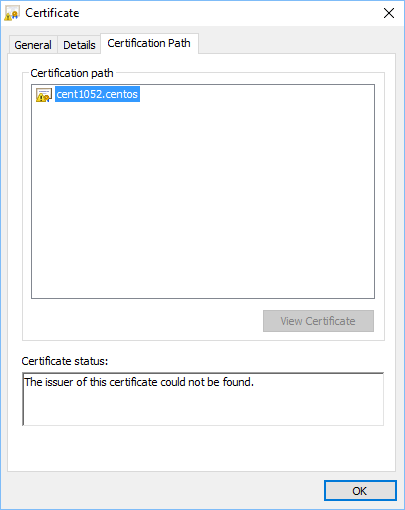
Tableau Server on Linux with HTTPS.

Enjoy Today friends.
 Technology gems to share