
Date is very important dimension for analysis but there are many date formats out there and different people prefer certain date format than the rest.
So what should we do to make sure Tableau can understand your date format ?
You can use Dateparse function if your data sources is one of these:
- non-legacy Excel
- text file connections
- Google Sheets
- MySQL
- Oracle
- PostgreSQL
- Tableau Extracts
Or you can always transform your date manually using string concatenation function if you use other data sources not listed above.
Dateparse function converts a string to a datetime type. Dateparse function requires you to provide two parameters: format and string.
Data source sample in Excel:
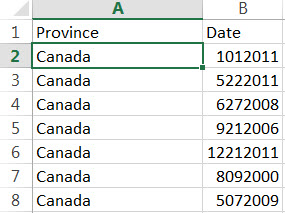
Import those to Tableau Desktop and set Date column data type to String.
And then create below Calculated Field below:
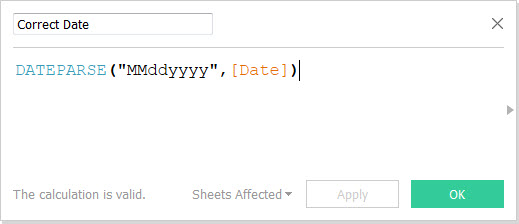
Tableau will convert the “Date” dimension string data type into new “Correct Date” dimension with the correct date data type.
“Correct Date” dimension is a proper date dimension so you can get access to all date functionalities such as built-in hierarchy generation below:

Check out detail documentation here.
And the sample workbook in Tableau Public here.
Enjoy Today !
 Technology gems to share